GTA 6 Boat Getaway AI – Be the Speedboat Getaway Driver in Vice City
GTA 6 Boat Getaway AI makes you the getaway driver in a GTA 6 style Vice City escape: you wait at the wheel of a white speedboat by a neon pier, mutter "come on, come on", a red muscle car skids up with police behind it, two robbers sprint down the boardwalk and leap into the boat, and you chuckle and pull away. Upload one photo and you are the driver. Your face, hair and top come from the photo, drawn in the scene's video-game style; the runners, the police, the pier, the camera and the sound come from the scene, and you get a 15-second landscape 4:3 MP4 in 480p or 720p.
GTA 6 Boat Getaway AI at a glance
- Photos needed
- 1 · The driver
- Video length
- About 15 seconds
- Format
- Landscape 4:3 MP4, 480p or 720p
- Sound
- Original soundtrack added
- Credits per video
- 60–135 credits
- Typical wait
- 3–10 minutes; you can close the page
- Privacy
- Photos deleted after 7 days, videos after 30, visible only to you
How do you make your own GTA 6 Boat Getaway AI video?
- 1
Upload one clear photo of one person with the face easy to see; that person becomes the driver.
- 2
Pick 480p (60 credits) or 720p (135 credits) and press Generate.
- 3
Download the 15-second MP4 with sound from My videos, usually a few minutes later.
What does the GTA 6 Boat Getaway AI video look like?
The GTA 6 Boat Getaway AI video is a 15-second heist escape at pink dusk on a neon Vice City waterfront. A getaway driver waits in a speedboat, a red muscle car arrives with the police on its tail, two robbers run for the pier and jump in, and the boat takes off.
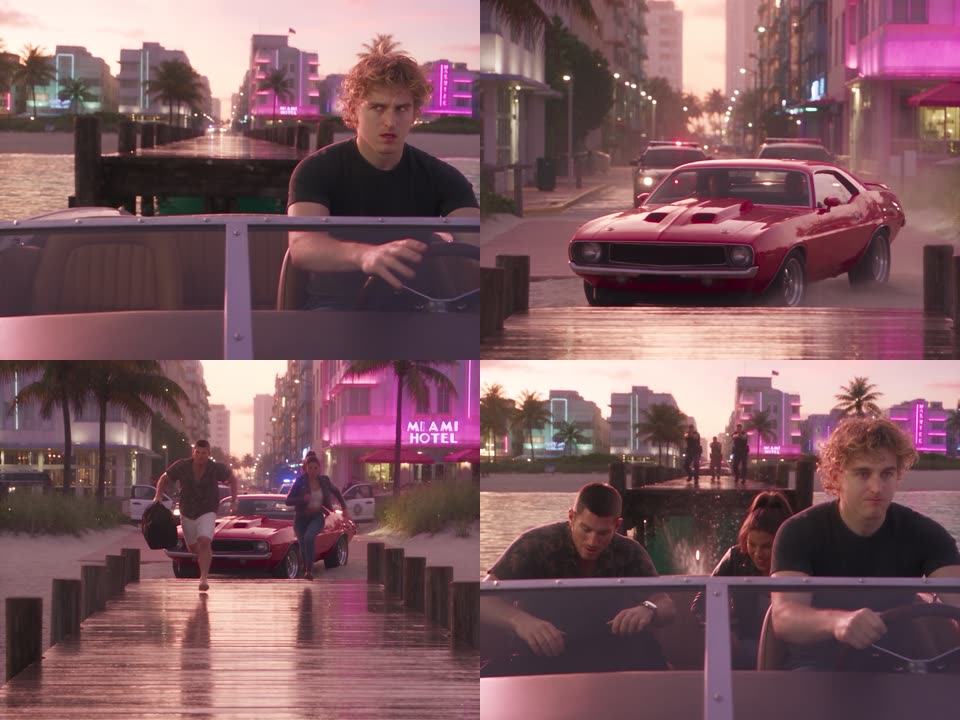
In your version, the driver is you: your face, your hair and your top, drawn in the scene's game look. The runners, the police, the pier and the sound stay the same.
Where does the GTA 6 boat getaway come from?
GTA VI takes the series back to Vice City, in the fictional state of Leonida, with a criminal couple at its heart, and it launched on 19 November 2026. Fans have been dropping themselves into GTA 6 style scenes with AI ever since, and the speedboat getaway driver is one of the favourite roles: you never rob anything, you just have to be there when they run.
The scene here is an AI-made recreation in the style of the game. It uses no game footage or characters, and this site is not affiliated with Rockstar Games or Take-Two Interactive.
What happens in the scene, second by second?
| Time | What happens |
|---|---|
| 0–1.6 s | A white speedboat glides up to a wooden pier at pink dusk |
| 1.6–3.6 s | Close-up of the driver at the wheel: "come on, come on" |
| 3.6–7.3 s | A red muscle car skids onto the boardwalk, police lights behind it |
| 7.3–8.4 s | The driver looks back over the shoulder: "Come on!" |
| 8.4–11.5 s | A man with a duffel bag and a woman in a leather jacket sprint down the boardwalk and jump |
| 11.5–15 s | They land in the boat, the driver chuckles and pulls away |
Will the GTA 6 Boat Getaway AI video actually look like me?
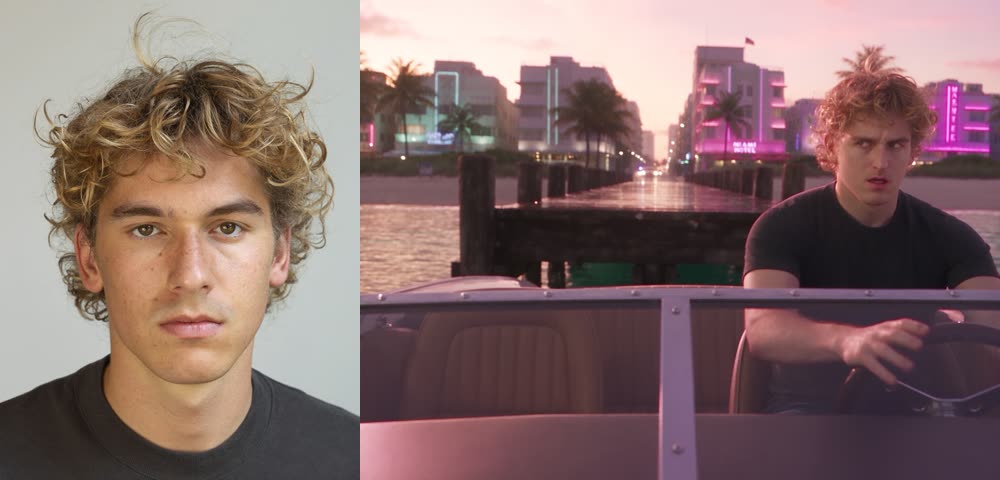
Yes. The face, curls and black T-shirt from the photo below carry through both close-ups and the final shot with the two runners, drawn in the same game look as the rest of the scene.
This example was generated with the same model and prompt as this effect and was not edited.
| Stays from the scene | Comes from your photo | May vary between runs |
|---|---|---|
| The pier, the neon waterfront and the boat | Your face and skin tone | The exact expression on each line |
| The two runners, the car and the police | Your hairstyle and hair colour | Small details of the top the photo doesn't show |
| The camera, the cuts, the lines and the timing | Your top and its colours | How strongly the game look is applied |
| 15 seconds, landscape 4:3 |
Which photo works best for the GTA 6 Boat Getaway AI video?
The driver is seen from the chest up in every shot, so the face and top matter more than your trousers or shoes.
| Photo | What usually happens |
|---|---|
| One adult, face clear, head and shoulders or waist-up | Best match in both close-ups |
| Even daylight or soft indoor light | Natural skin under the pink dusk |
| A cartoon, anime or pet photo | Works too; it's redrawn in the game look |
| Sunglasses, caps, hair over the face | Harder to keep the face recognisable |
| Group photos | Doesn't work: use one person per photo |
Only use a photo of yourself or of an adult who agreed to be in the video, and never a celebrity or a minor.
How do you post a GTA 6 Boat Getaway AI video?
Post it with the sound on; "come on, come on" and the jump into the boat are what people replay.
- Cast your friends. "Me waiting for the group chat to finish getting ready" or "Always the getaway driver".
- Label it as AI. Use the platform's AI label and keep it as a fan edit, off ads and brand accounts.
- Want more GTA? GTA 6 Apocalypse AI has you playing through the end of the world, and GTA 5 Goodbye AI says goodbye to Los Santos.
Price
This 15-second clip costs 60 credits in 480p and 135 credits in 720p HD. Credits are charged per second of video.
No credits needed: pay for just this video from $9.99, once. Your first video is $4.99.
Compare packs and plans →Good to know
- 480p is enough for a story or a group chat; 720p keeps faces sharper in close-ups and full-body shots, which is worth it for public posts.
- The sound is already in the MP4 and the moves are timed to it, so keep the original audio when you post.
- If the face drifts, try a sharper photo with even front light and nothing covering the eyes. Crop group photos to one person.
- A failed generation returns its credits automatically. If a video finishes but looks wrong, contact support with the video link.
- TikTok, YouTube and Instagram ask creators to label realistic AI video. Turn on the AI label when you post.
- Your photos are deleted after 7 days, and the video has no extra watermark.
Frequently asked questions
What is GTA 6 Boat Getaway AI?
An AI video effect that makes you the speedboat getaway driver in a GTA 6 style scene: waiting at the wheel, the police chase arriving, two robbers jumping aboard and the boat pulling away from a neon Vice City pier, with the sound already in the file.
How many photos do I need?
One. Only the driver changes; the two runners, the police and the pier stay as they are in the scene.
Will I look like a real photo or like the game?
Like the game. Your face, hair, colours and top come from the photo, but you are drawn in the same video-game look, pink dusk and neon light as the other two, so you don't look pasted in. Cartoon, anime and pet photos work the same way.
Is this real GTA 6 footage?
No. The scene and its characters are AI-made in the style of GTA VI; there is no game footage in it. This site is not affiliated with Rockstar Games or Take-Two Interactive.
How long is the video and what format?
15 seconds, landscape 4:3, 480p or 720p, with sound, including the driver's "come on, come on" and "Come on!".
How much does it cost?
60 credits at 480p or 135 credits at 720p. Credits are charged per second of video, and confirmed failures are refunded automatically.
Which photo works best?
A sharp, front-facing photo of one adult in even light, head and shoulders or waist-up, without sunglasses or hair over the face. The driver gets two close-ups, so the face matters most, and the top you wear carries into the video.
Inspired by GTA 6 fan edits. Not affiliated with, endorsed by or sponsored by Rockstar Games or Take-Two Interactive. Grand Theft Auto and GTA belong to their owners; the scene and its characters are AI-made.
Last updated 2026-11-24
More effects
Bulin 47 AI
Step into the Bulin 47 freestyle crowd with one photo.
Photos: 1 · from 60 credits
Burning Bridges AI
Take the yellow-shirt spot in the Burning Bridges party video.
Photos: 1 · from 60 credits
Crazy Frog AI Chase
Two photos, one invisible-motorcycle chase across five scenes.
Photos: 2 · from 56 credits
ABCDEFG I Need Money AI
Rap the alphabet, then point at the camera and ask for money.
Photos: 1 · from 36 credits