AI Doodle Dance Partner – Dance Next to a Line-Art Twin of You
AI Doodle Dance Partner turns one photo into a 10-second dance with your own cartoon twin: you stand in front of a warm wall and bench, a glowing silhouette appears beside you and turns into a white, black-outlined doodle of you, and the two of you react, high-five, side-step and dance forward in sync. Your face and hair come from the photo and the doodle copies your hairstyle and features, while the outfit, the wall, the moves and the sound come from the clip.
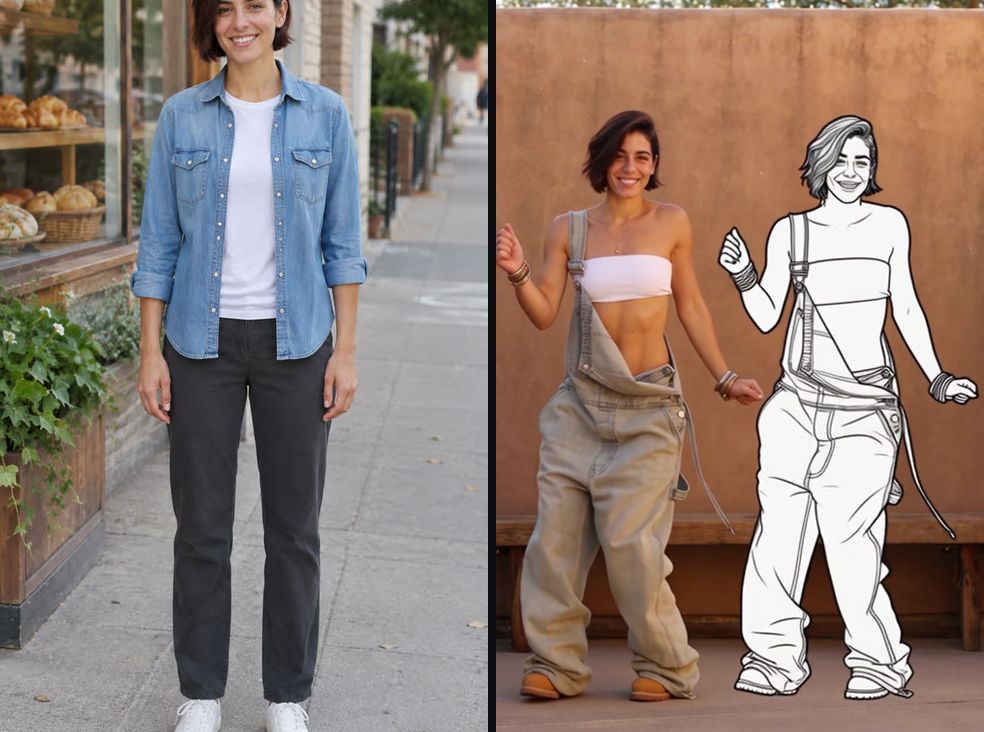
AI Doodle Dance Partner at a glance
- Photos needed
- 1 · Your photo
- Video length
- About 10 seconds
- Format
- Vertical 9:16 MP4, 480p or 720p
- Sound
- Original soundtrack added
- Credits per video
- 40–90 credits
- Typical wait
- 3–10 minutes; you can close the page
- Privacy
- Photos deleted after 7 days, videos after 30, visible only to you
How do you make your own AI Doodle Dance Partner video?
- 1
Upload one clear photo of one adult, face visible and hair easy to see.
- 2
A full-body or knee-up photo works best, because you and the doodle stay in frame from head to toe.
- 3
Press Generate, then download the 10-second MP4 with the sound from My videos.
What does the AI Doodle Dance Partner video look like?
The AI Doodle Dance Partner video is a 10-second vertical clip shot in one take in front of a warm, sunlit wall with a wooden bench and trees peeking over the top. You start alone on the left. A bright, glowing silhouette of a person fades in on your right, and as the glow clears it becomes a doodle: a flat white figure outlined in black ink, drawn with your haircut and face. The two of you gasp at each other, turn face to face for a high-five, then dance the rest of the clip side by side, swinging your arms, stepping and finally moving toward the camera together.
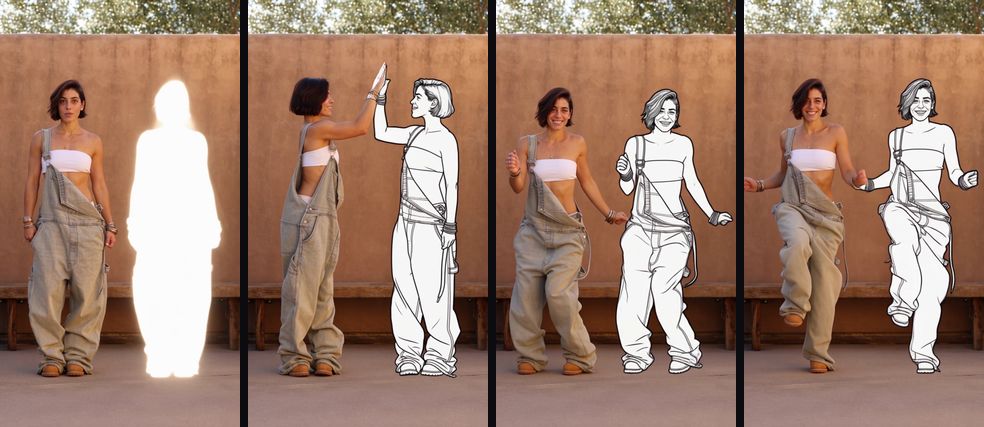
The joke is that your partner is you, just drawn. Everything the real you does, the doodle does at the same moment, from the shocked face to the last step.
Where does the AI doodle dance partner trend come from?
The AI doodle dance partner trend sits between two kinds of AI posts that took off this year. One is the cartoon version of yourself: Creative Bloq covered how AI caricatures, illustrated portraits made from a single photo, spread everywhere. The other is AI dance clips built from someone's movement: Kapwing listed an AI baby dancing trend in January 2026, made with a motion feature that turns a dance video into a baby version of the dancer, and noted variations with pets and cartoon characters.
The doodle dance partner puts both into one frame: the real you and a hand-drawn-looking you, dancing as a duo. "AI doodle dance partner" is the name people search for it. This site is not affiliated with any app or creator, and the example is made from an AI-generated photo, not from anyone's real video.
What are the AI Doodle Dance Partner moves, second by second?
The routine is short and front-loaded: the reveal and the reaction happen in the first four seconds, then you dance.
| Time | What happens | Detail to watch |
|---|---|---|
| 0–1 s | A glowing silhouette appears next to you | You stand still, facing the camera |
| 1–1.5 s | The glow clears into the doodle | White figure, black outlines, your haircut |
| 1.5–2.5 s | Both of you gasp, hands at your mouth | The doodle copies your expression |
| 2.5–4 s | You turn face to face and high-five | The only moment you see each other in profile |
| 4–6.5 s | Side steps, arm swings and small fist pumps | Perfectly mirrored timing |
| 6.5–10 s | Bouncy steps forward together | You end side by side, almost hand in hand |
What makes the doodle twin different from a real clone?
The doodle twin is drawn, not filmed, which is what makes it read instantly on a small screen. A real-looking clone of you can be confused with a twin sibling or a bad edit; a white figure with black ink lines is obviously a drawing, so the viewer gets the joke in the first second.
It also keeps the doodle simple. Your face is reduced to a few lines, your hair to its shape and parting, your outfit to its seams and straps. That is why the haircut matters more than anything else in your photo: a distinctive bob, curls, a fade or long braids make the doodle unmistakably you, while small details such as freckles or earrings may not carry over.
Will the AI Doodle Dance Partner video actually look like me?
Yes. The real you keeps your face, hairstyle, skin tone and build from the photo in every frame, and the doodle is drawn with the same haircut and features, so it reads as your twin rather than as the dancer from the original clip. What changes is the outfit: both of you wear the trend's white bandeau top and baggy overalls, not the clothes in your photo.
The example on this page came out of this effect from a photo of an AI-generated, fictional adult; it is not the original clip and nothing in it was edited. Notice how the doodle took her short bob and dropped the long braids and glasses of the original dancer. One tip: the warm wall and the evening light can come out a little different from run to run, from golden to a deeper terracotta, while the bench and the framing stay.
What comes from your photo and what stays from the clip:
| Stays from the clip | Comes from your photo | May vary between runs |
|---|---|---|
| The warm wall, bench and trees | Your face, hair and skin tone | The exact colour of the wall and light |
| The outfit: bandeau top and overalls | Your build | The colour of the overalls |
| The glow reveal and every move | The doodle's haircut and features | How detailed the doodle's lines are |
| The 10-second length and the sound | Glasses, if you wear them | Small accessories like bracelets |
How do I do the AI doodle dance partner trend without filming it?
Upload one photo on this page and press Generate, and AI Doodle Dance Partner makes the whole clip, so you skip filming yourself dancing, drawing or animating a cartoon twin frame by frame, timing the glow reveal, and lining up two copies of the same routine so they move in sync.
Which photo works best for AI Doodle Dance Partner?
One sharp, front-facing photo with your hair clearly visible works best. You and the doodle are both shown head to toe, and the doodle borrows your haircut, so a photo where your hair is hidden or blurred gives it little to draw.
| Photo | What usually happens |
|---|---|
| Full body or knee-up, facing the camera | Best match for both you and the doodle |
| Distinctive haircut, hair visible | The doodle is instantly recognisable as you |
| Close-up selfie | Face is right; the body is guessed from the clip |
| Cap, hood or hair tied under a hat | The doodle loses the feature that makes it you |
| Sunglasses | The doodle may draw them in or drop them |
| Group photo | Crop to one person before uploading |
How do you post an AI Doodle Dance Partner video?
Lean into "me and me". The format works best when the caption treats the doodle as a separate person.
- The only one who keeps up. "Finally found a dance partner who knows all my moves."
- Inner child, outer adult. "Me and the version of me in my sketchbook."
- Introvert edition. "When you want to go out dancing but only trust yourself."
- Pair it with a real duet. Post it next to Ice Ice Baby AI, where you dance with an actual friend, and let people pick their favourite partner.
- Want another twin? Wassup Been a Minute AI adds a floating anime version of you on a rooftop.
Price
This 10-second clip costs 40 credits in 480p and 90 credits in 720p HD. Credits are charged per second of video.
No credits needed: pay for just this video from $9.99, once. Your first video is $4.99.
Compare packs and plans →Good to know
- 480p is enough for a story or a group chat; 720p keeps faces sharper in close-ups and full-body shots, which is worth it for public posts.
- The sound is already in the MP4 and the moves are timed to it, so keep the original audio when you post.
- If the face drifts, try a sharper photo with even front light and nothing covering the eyes. Crop group photos to one person.
- A failed generation returns its credits automatically. If a video finishes but looks wrong, contact support with the video link.
- TikTok, YouTube and Instagram ask creators to label realistic AI video. Turn on the AI label when you post.
- Your photos are deleted after 7 days, and the video has no extra watermark.
Frequently asked questions
What is AI Doodle Dance Partner?
An AI video effect where the person in your photo dances side by side with a black-line cartoon version of themselves. The doodle appears out of a glow, copies your hairstyle and features, and does every move with you.
How many photos do I need?
One. The doodle is drawn from the same photo, so you don't upload a second picture for it.
Will the doodle look like me?
Yes. It is drawn as a line-art version of you: your haircut, face shape and, if you wear them, glasses carry over into the drawing.
Can the doodle be a friend instead of me?
Not in this version. The doodle is always a cartoon twin of the person in your photo.
Do I keep my own clothes?
No. You wear the outfit from the trend, a white bandeau top and baggy overalls, and the doodle wears a line-drawn copy of it. Your face, hair, skin tone and build come from your photo.
How long is the video?
10 seconds, vertical 9:16, with the sound from the clip.
Do I need to know the dance?
No. The surprised reaction, the high-five, the side steps and the dance forward all come from the clip, timed to the beat.
Can men use it?
Yes. Anyone can upload a photo; the doodle follows your hair and face, and the overalls work on any build.
Is it a filter on my own video?
No. You don't film anything: the whole clip is generated from your photo.
Inspired by the AI doodle dance partner trend of dancing next to a cartoon version of yourself. Not affiliated with any app or creator.
Sources
Last updated 2026-11-15
More effects
A2O LITE Neon Dance AI
Two photos become a synchronized neon K-pop style duet.
Photos: 2 · from 60 credits
Dame Hombro AI Dance
Take the lead spot in the Dame Hombro shoulder dance with one photo.
Photos: 1 · from 60 credits
Alors On Danse AI
Put two friends or pets into the white-studio keyboard meme.
Photos: 2 · from 60 credits
Balcony Stare AI
Two photos become a retro Italo disco DJ and dancer on a sunny balcony.
Photos: 2 · from 20 credits