Wassup Been a Minute AI – Three Outfit Flexes With a Floating Anime Twin
Wassup Been a Minute AI turns one photo into the outfit-flex video: on a rooftop at night, with city lights behind you, you show off a red jacket, flash to a black T-shirt with a chain and a fan of cash, then flash again to a blue graphic tee while you count your money, and a tiny chibi-style anime twin floats in the corner the whole time. Your face, hair and build come from the photo, the three outfits, the rooftop, the twin and the sound come from the clip, and you get a 10-second vertical MP4.
Wassup Been a Minute AI at a glance
- Photos needed
- 1 · Your photo
- Video length
- About 10 seconds
- Format
- Vertical 9:16 MP4, 480p or 720p
- Sound
- Original soundtrack added
- Credits per video
- 100–200 credits (from $9.99)
- Typical wait
- 3–10 minutes; you can close the page
- Privacy
- Photos deleted after 7 days, videos after 30, visible only to you
How do you make your own Wassup Been a Minute AI video?
- 1
Upload one clear photo of one adult. A half-body or full-body photo works best, because you are seen from head to knees in all three looks.
- 2
Pick 480p for a quick post, or 720p if you want the cash and the chain sharper.
- 3
Press Generate, then download the 10-second MP4 with the sound from My videos.
What does the Wassup Been a Minute AI video look like?
The Wassup Been a Minute AI video is a 10-second vertical clip of one person on a concrete rooftop at night, a whole city glittering behind them, changing outfits twice in quick white flashes. First you stand in a red jacket over a grey shirt, tugging at the collar and swaying to the beat. A white flash later you are in a black T-shirt with a heavy silver chain, fanning a stack of banknotes at the camera. After a second flash you are in a blue graphic tee and baggy jeans, looking down and counting the money in your hands. All the while a tiny anime character hovers in the top corner of the frame, like a sidekick watching the show.
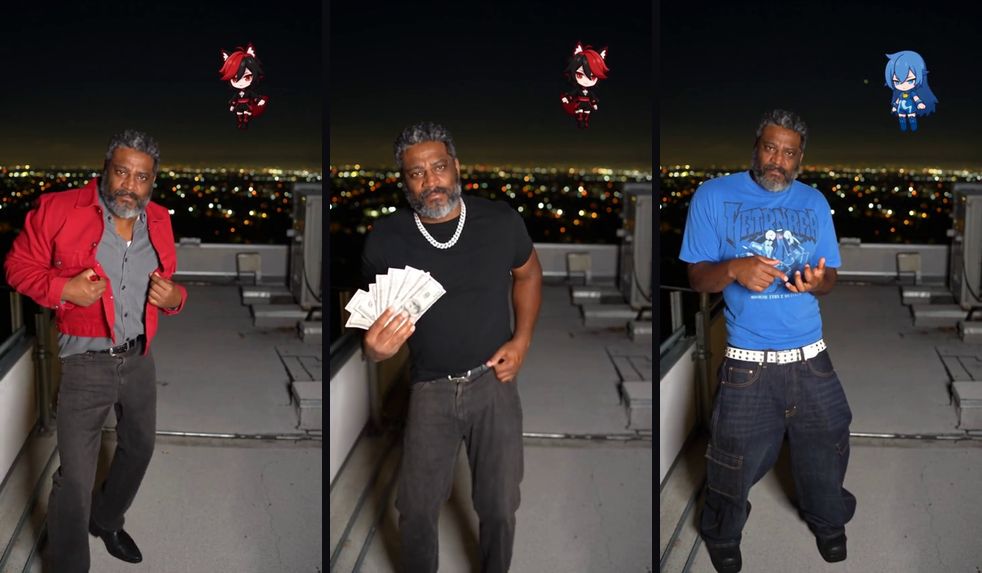
In the AI version, the person on the rooftop is you. Your face, hair, beard and build come from your photo; the rooftop, the city lights, the three outfits, the cash, the floating twin and the sound come from the clip.
Where does the Wassup Been a Minute trend come from?
The Wassup Been a Minute trend is a short-video template rather than a news story: it spreads as a format people copy, and no outlet has written up its origin yet, so we won't invent one. What makes it recognisable is the pairing of a real person with a drawn anime double who mirrors the vibe, plus a fast run of outfit changes that ends with counting cash, a classic "I'm doing well these days" flex for a "wassup, it's been a minute" hello.
The double is drawn in the chibi style. As Wikipedia's article on chibi explains, chibi is a Japanese slang word for something small, and in anime and manga fandom it names a style where characters are drawn tiny, with oversized heads and big eyes. That is why the twin reads as cute and cheeky next to a life-size person. The trend also goes by Wassup in a Minute; both spellings point to the same video. This site is not affiliated with any creator, song, anime studio or character.
What happens in each of the three Wassup looks?
The Wassup Been a Minute clip is three short scenes stitched with white flashes, and each look has its own move.
| Time | Your look | What you do |
|---|---|---|
| 0–3 s | Red jacket over a grey shirt | Pull at the jacket, sway and tilt your head |
| ~3.3 s | White flash | Cut to the next look |
| 3.5–6.5 s | Black tee, silver chain | Fan a stack of cash at the camera |
| ~6.7 s | White flash | Cut to the last look |
| 7–10 s | Blue graphic tee, baggy jeans | Look down and count the money |
The joke builds with each flash: casual, then flashy, then quietly counting the bag. The anime twin stays in the top corner through all three, and its look can switch along with your outfit.
Will the Wassup Been a Minute AI video actually look like me?
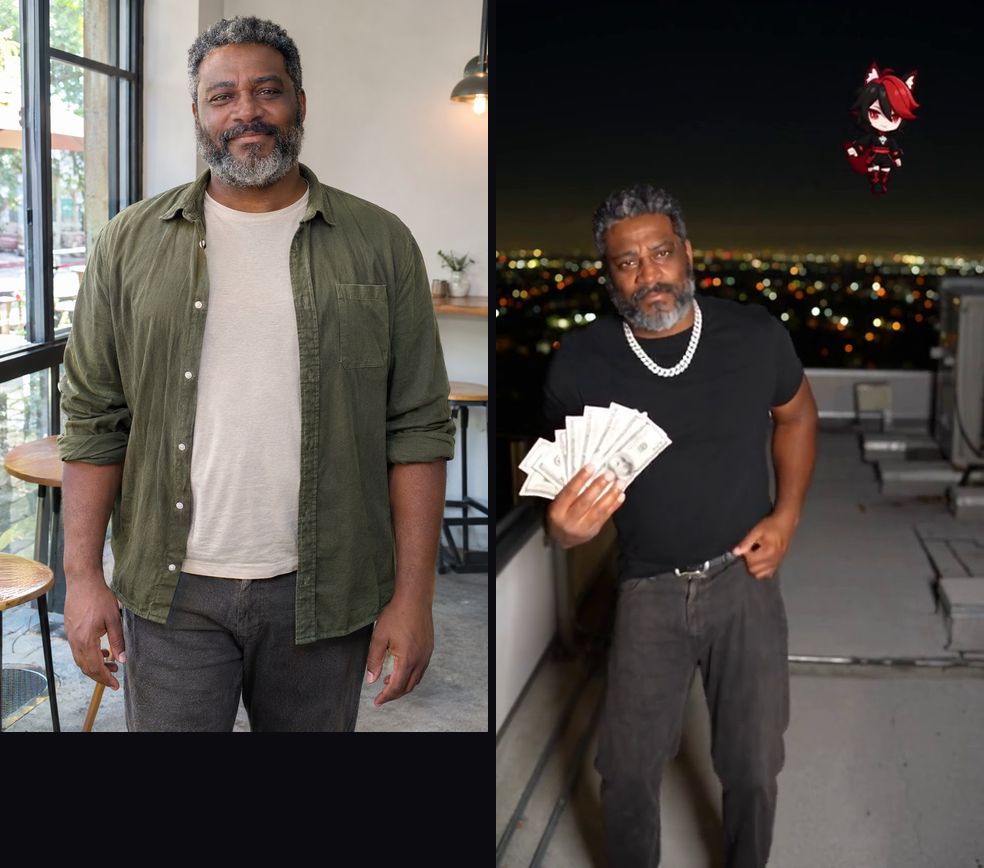
Yes. Your face, hairstyle, hair colour, skin tone, beard and build carry through all three looks, including right after each white flash, when the outfit changes but you don't. The outfits, the chain and the cash come from the clip, because the outfit changes are the joke.
The example on this page was made with this effect from a photo of an AI-generated, fictional adult. It is not the original clip and it is not edited. Notice that his olive shirt from the photo is gone: in every scene he wears the clip's outfits instead. The anime twin is drawn fresh for each video, so yours may have different hair or colours; it stays small, in the top corner.
What comes from your photo and what stays from the clip:
| Stays from the clip | Comes from your photo | May vary between runs |
|---|---|---|
| The night rooftop and city lights | Face, hairstyle and hair colour | The anime twin's hair and outfit |
| The three outfits, the chain and the cash | Skin tone, beard and glasses | Exact fan of the banknotes |
| The two white flashes and their timing | Build and height | Small details of the city lights |
| The 10-second length and the sound | Your expression | The graphic on the blue tee |
How do I do the Wassup Been a Minute trend without filming it?
Upload one photo on this page and press Generate, and Wassup Been a Minute AI puts you on the rooftop in all three looks, so you skip finding a night rooftop, owning a red jacket, a chain and a stack of cash, timing two outfit changes and drawing your own anime sidekick.
Which photo works best for the Wassup Been a Minute AI video?
A sharp, front-facing half-body photo of one adult, in even light, works best. You fill most of the frame in every look, so the face and hairstyle carry your likeness while the outfits come from the clip.
| Photo | What usually happens |
|---|---|
| Half body or full body, facing the camera | Best match: you are clear in all three looks |
| Close-up selfie | The face is right; your build is guessed |
| Sunglasses or a cap | Hides the eyes or hair that make you recognisable |
| Very dark or backlit photo | Details get lost against the night background |
| Group photo | The AI may pick the wrong person; crop to one |
How do you post a Wassup Been a Minute AI video?
Post it as a comeback. The format is a "long time no see" flex, so it lands best when the caption says where you've been.
- Use it as a return post. "Wassup, been a minute" over the first look works for coming back to an account after a break.
- Make it a glow-up. "Me at the start of the year vs me now" turns the three outfits into a before-and-after.
- Payday energy. Post it on payday or after a win, captioned with what the cash stands for.
- Want another one-photo flex? ATM Glitch AI buries you in cash on fake CCTV, and Bulin 47 AI puts you in a red-lit freestyle.
Price
480p costs 100 credits and 720p HD costs 200 credits. The $9.99 starter pack covers one 480p video.
No credits needed: pay for just this video from $9.99, once. Your first 480p video is $4.99.
Compare packs and plans →Good to know
- 480p is enough for a story or a group chat; 720p keeps faces sharper in close-ups and full-body shots, which is worth it for public posts.
- The sound is already in the MP4 and the moves are timed to it, so keep the original audio when you post.
- If the face drifts, try a sharper photo with even front light and nothing covering the eyes. Crop group photos to one person.
- A failed generation returns its credits automatically. If a video finishes but looks wrong, contact support with the video link.
- TikTok, YouTube and Instagram ask creators to label realistic AI video. Turn on the AI label when you post.
- Your photos are deleted after 7 days, and the video has no extra watermark.
Frequently asked questions
What is the Wassup Been a Minute AI video?
An AI video effect that puts the person in your photo on a night rooftop for a three-look outfit flex: red jacket, then black tee with a chain and cash, then a blue graphic tee, with a white flash between looks and a small anime twin floating beside you.
Is it Wassup Been a Minute or Wassup in a Minute?
Both spellings are used for the same trend. People search for either, and this effect makes the same video.
Is the anime twin made from my photo?
No. The twin is a small chibi-style anime character that keeps the meme's look; your face only goes on the real person in the middle.
Will my twin look the same as in the example?
Not always. The twin is generated fresh each time, so its hair colour and outfit can differ from one video to the next. It stays a small anime character in the top corner.
Do I keep my own clothes?
No, and that is the point: the three outfit changes are the joke. You wear the clip's red jacket, black tee with chain, and blue graphic tee, while your face, hair, beard and build come from your photo.
How long is the video?
10 seconds, vertical 9:16, three looks with two quick white flashes between them, and the sound already in the file.
Which photo works best?
A sharp, front-facing half-body photo of one adult in even light. You fill most of the frame in every look, so a clear face and visible hairstyle matter most.
Is the money real?
No. The cash is part of the clip, a prop for the flex. Nothing in the video is real money.
Is this connected to an anime or a music artist?
No. The effect follows a fan video format. This site is not affiliated with any creator, song, anime studio or character.
Inspired by the Wassup Been a Minute (Wassup in a Minute) video trend. Not affiliated with any creator, song or anime.
Sources
Last updated 2026-11-03
More effects
Bulin 47 AI
Step into the Bulin 47 freestyle crowd with one photo.
Photos: 1 · from 100 credits
Burning Bridges AI
Take the yellow-shirt spot in the Burning Bridges party video.
Photos: 1 · from 100 credits
Crazy Frog AI Chase
Two photos, one invisible-motorcycle chase across five scenes.
Photos: 2 · from 100 credits
ABCDEFG I Need Money AI
Rap the alphabet, then point at the camera and ask for money.
Photos: 1 · from 100 credits