Ali G Driving Scene AI – Dance by a Supercar, Then Drive It From One Photo
Ali G Driving Scene AI turns one photo into the swaggering supercar clip: you hype yourself up in the driver's seat, dance next to a yellow sports car in a black cap, black tee and gold chain, slide behind the wheel, and finish leaning out of the window. Your face, hair and build come from the photo, the car, the shots and the sound come from the clip, and you get a 12-second 3:4 MP4.
Ali G Driving Scene AI at a glance
- Photos needed
- 1 · Your photo
- Video length
- About 12 seconds
- Format
- Portrait 3:4 MP4, 480p or 720p
- Sound
- Original soundtrack added
- Credits per video
- 100–200 credits (from $9.99)
- Typical wait
- 3–10 minutes; you can close the page
- Privacy
- Photos deleted after 7 days, videos after 30, visible only to you
How do you make your own Ali G Driving Scene AI video?
- 1
Upload one photo of an adult with the face clearly visible. Clean-shaven or bearded, with or without glasses, the video follows your photo.
- 2
Pick 480p for a quick post, or 720p for a sharper face behind the windscreen.
- 3
Press Generate, then download the 12-second MP4 with the sound from My videos.
What does the Ali G driving scene AI video look like?
The Ali G driving scene AI video is a 12-second, slightly tilted phone clip of one man treating a yellow supercar like his personal stage. It opens in the driver's seat with a hype-up gesture, cuts to him dancing beside the open door in a sunny car park, jumps to a view through the windscreen as he drives with one hand, flashes a close-up of jewelled hands on the steering wheel, shows him dancing again behind the bonnet, and ends with him leaning out of the window. He wears a black baseball cap, a black T-shirt and a heavy gold chain the whole way through.
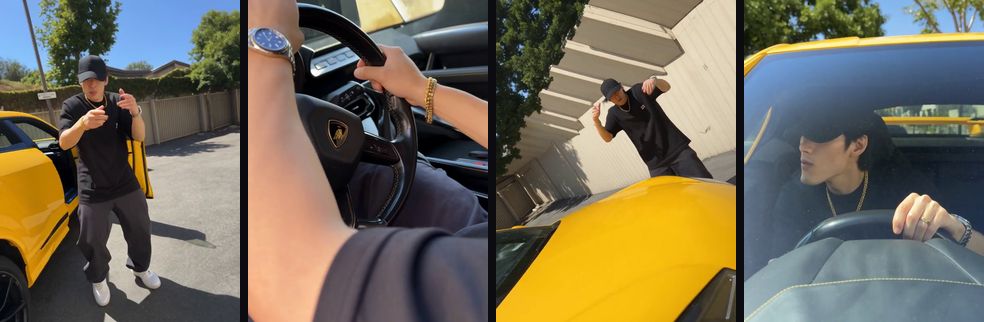
In the AI version, the man with the car is you. Your face, hair and build come from your photo; the car, every cut and the attitude come from the clip, and the original sound plays over the top.
Where does the Ali G driving scene trend come from?
The Ali G driving scene trend borrows its name from Ali G, the wannabe gangster from Staines played by Sacha Baron Cohen. According to Wikipedia, the character started on Channel 4's The 11 O'Clock Show and got his own feature film, Ali G Indahouse, in 2002, where the joke is the gap between the life Ali imagines and his suburban reality. In 2026 the character returned in Ali G: Who Iz I?, which Variety reports as an Amazon MGM release that Baron Cohen also directed, opening in cinemas on 23 October 2026.
Online, "Ali G driving scene" is used for short clips with the same energy: somebody acting far more gangster than the situation needs, with a flashy car as the prop. The clip this effect follows is one of those, filmed with a different performer and a borrowed-looking supercar; it is not footage from either film. This site is not affiliated with Sacha Baron Cohen, the Ali G films or any car brand, and the video doesn't use their likeness.
What happens in the Ali G driving scene, shot by shot?
The Ali G driving scene is six quick shots, each held for one to three seconds, so the joke lands even if someone scrolls past halfway.
| Time | Shot | What you do |
|---|---|---|
| 0–2 s | Inside the car, side view | Hype yourself up with hand gestures from the driver's seat |
| 2–4 s | Car park, beside the open door | Dance and point, full body |
| 4–6 s | Through the windscreen, then the wheel | Drive one-handed; the camera drops to rings and a watch on the wheel |
| 6–8 s | Behind the bonnet | Dance with your arms up, the car filling the bottom of the frame |
| 8–11 s | Through the windscreen | Drive and nod along, looking off to the side |
| 11–12 s | From outside the window | Lean out of the window as the clip ends |
The steering-wheel shot shows only hands, which is normal for this clip: you appear in every other shot.
Will the Ali G Driving Scene AI video actually look like me?
Yes. You get the 12-second driving clip with you as the man in the cap: your face, hairstyle, skin tone and build come from your photo and stay yours after every cut, from the car park dance to the windscreen close-ups. Facial hair and glasses follow your photo too, so you won't inherit the original performer's white beard or sunglasses.
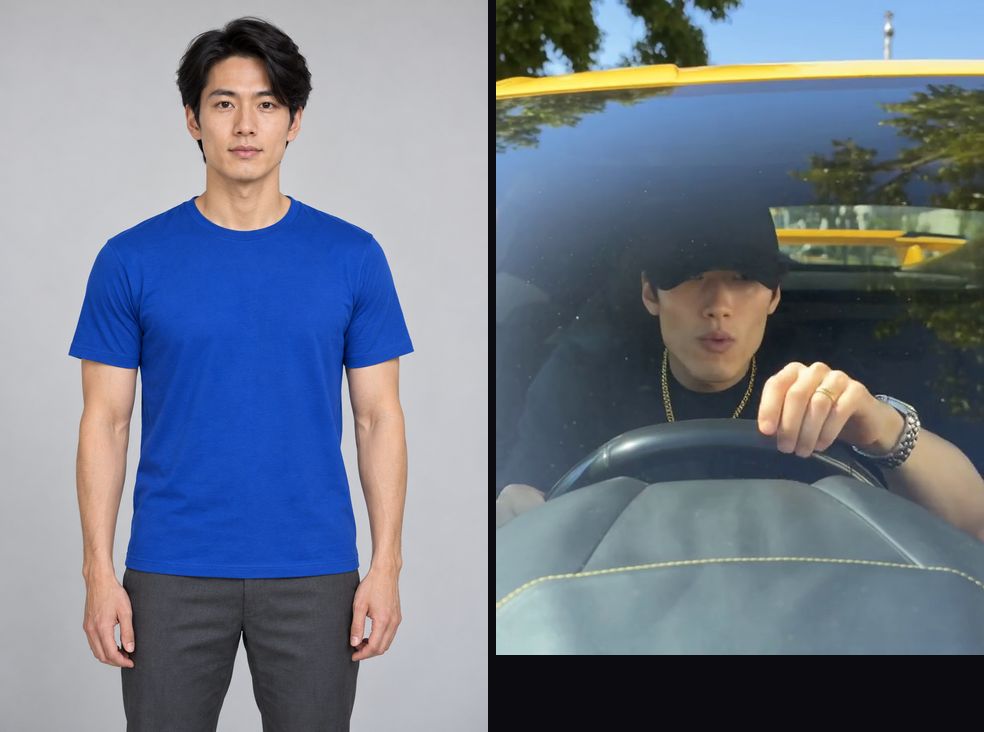
The example at the top of this page was made with this effect from a photo of an AI-generated, fictional young man with black hair, nothing like the original performer. It is not the original clip and it is not edited. It shows seconds 2 to 12; the video you get is the full 12 seconds and also includes the opening shot in the driver's seat. Through the windscreen the cap shades your eyes and the glass reflects the trees, exactly as in the original, so your face reads best in the car park and window shots.
What comes from your photo and what stays from the clip:
| Stays from the clip | Comes from your photo | May vary between runs |
|---|---|---|
| The yellow supercar, car park and sunshine | Face, hairstyle and hair colour | Reflections on the windscreen |
| Black cap, black T-shirt and gold chain | Skin tone, beard or no beard | Small details of rings and the watch |
| Every cut, dance move and angle | Glasses, if your photo has them | Stickers and badges on the car |
| The 12-second length and the sound | Body proportions | Exact expression in each shot |
How do I do the Ali G driving scene trend without filming it?
Upload one photo on this page and press Generate, and the Ali G Driving Scene AI recreates the clip with you in it, so you skip borrowing a supercar, finding an empty car park and getting a friend to film six angles.
Which photo works best for the Ali G driving scene?
A sharp, front-facing half-body photo of one adult works best. The clip shows you full body beside the car, through a windscreen and from below at the window, so the AI needs a clear face and a sense of your build; your own clothes don't matter, because the cap, tee and chain come from the clip.
| Photo | What usually happens |
|---|---|
| Half body, facing the camera, even light | Best match: your face holds in the car park and through the glass |
| Tight selfie | The face is right; body proportions in the dance shots are guessed |
| Wearing a hat or hood | The clip's cap replaces it, but hair shape can come out wrong |
| Sunglasses on | They stay on, and the windscreen shots get much harder to recognise |
| Side profile | The front-on windscreen shots may drift from your face |
A face that clearly doesn't belong in a supercar sells the joke: a polite office headshot, a graduation photo or a picture of your most sensible friend works better than a photo where you already look cool.
How do you post an Ali G driving scene video?
Post it as a fake flex. The clip is funniest when the caption makes the swagger obviously undeserved.
- Caption the gap. "Me after getting a £20 refund", "first day with my learner's permit" or "pulling up to the family barbecue" sets up the contrast before the first dance move.
- Make it a reveal. Post a normal photo of the person first, then the clip; the jump from office shirt to gold chain does the work.
- Run a series. The same car with a different friend each day ("whose car is it really?") keeps people coming back.
- Want a different car moment? The Unforgettable car reveal swipes a card to reveal the car you picked, and ABCDEFG I Need Money is a one-photo car selfie with a punchline.
Price
480p costs 100 credits and 720p HD costs 200 credits. The $9.99 starter pack covers one 480p video.
Compare packs and plans →Good to know
- 480p is enough for a story or a group chat; 720p keeps faces sharper in close-ups and full-body shots, which is worth it for public posts.
- The sound is already in the MP4 and the moves are timed to it, so keep the original audio when you post.
- If the face drifts, try a sharper photo with even front light and nothing covering the eyes. Crop group photos to one person.
- A failed generation returns its credits automatically. If a video finishes but looks wrong, contact support with the video link.
- TikTok, YouTube and Instagram ask creators to label realistic AI video. Turn on the AI label when you post.
- Your photos are deleted after 7 days, and the video has no extra watermark.
Frequently asked questions
What is the Ali G driving scene AI video?
An AI video effect that puts the person in your photo into a short, cocky car clip: dancing beside a yellow supercar, driving it with one hand on the wheel and leaning out of the window, cut to the original sound.
Is this footage from the Ali G films?
No. The clip is a modern recreation of the attitude people associate with Ali G, filmed with a different performer and a yellow sports car. It contains no footage from Ali G Indahouse or Ali G: Who Iz I?, and the video doesn't use Sacha Baron Cohen's likeness.
Do I get the cap and gold chain?
Yes. The black baseball cap, black T-shirt and gold chain come from the clip, because the outfit is part of the joke. Your face, hairstyle, skin tone and build come from your photo.
Will I have a beard or sunglasses like the original performer?
Only if your photo does. Facial hair and glasses follow your photo, so a clean-shaven face stays clean-shaven and you can see your eyes in every shot.
How long is the video?
12 seconds in a 3:4 frame, with the sound already in the file. The example on this page shows seconds 2 to 12; your video also includes the two-second opening in the driver's seat.
Do I need my own car?
No. The yellow supercar, the car park and the interior come from the clip. You only upload a photo of yourself.
Can I put a friend in the passenger seat?
Not in this version. The clip has one person, so the effect takes one photo. Make a second video with your friend's photo and post them together.
Which photo works best?
A sharp, front-facing half-body photo of one adult in even light. Your face is seen through a windscreen and from a low angle beside the car, so a clear face matters more than your outfit.
Can I use it to advertise a car or a business?
We don't recommend it. The clip, its sound and the car's design belong to other people, and the name refers to a famous character, so commercial use could infringe their rights. Personal posts are the usual use.
Inspired by the Ali G driving scene trend. Not affiliated with Sacha Baron Cohen, the Ali G films or any car brand, and the video does not use their likeness.
Sources
Last updated 2026-10-28
More effects
Day 1 of Owning a Roadster
Replace the golden retriever driver with you or your pet.
Photos: 1 · from 100 credits
Unforgettable Car AI
Pick a card, cover the lens, reveal your dream car.
Photos: 1 · from 100 credits
Bulin 47 AI
Step into the Bulin 47 freestyle crowd with one photo.
Photos: 1 · from 100 credits
Burning Bridges AI
Take the yellow-shirt spot in the Burning Bridges party video.
Photos: 1 · from 100 credits