2027 New Year AI – Climb the Giant 2027 Numbers From One Photo
2027 New Year AI turns one photo into a Hello 2027 video: you pull yourself up giant white marble numbers on a mountain ridge, stand on top of the 2027 and throw your arms open as the camera pulls back over the peaks at sunset. Your face, hair and clothes come from the photo, the numbers, the mountains, the camera move and the sound come from the clip, and you get a 6-second vertical MP4.
2027 New Year AI at a glance
- Photos needed
- 1 · Your photo
- Video length
- About 6 seconds
- Format
- Vertical 9:16 MP4, 480p or 720p
- Sound
- Original soundtrack added
- Credits per video
- 100–200 credits (from $9.99)
- Typical wait
- 3–10 minutes; you can close the page
- Privacy
- Photos deleted after 7 days, videos after 30, visible only to you
How do you make your own 2027 New Year AI video?
- 1
Upload one clear photo of one adult. A full-body or knee-up photo works best, because you end up small on top of the numbers.
- 2
Pick 480p for a quick post, or 720p if you want the wide mountain shot sharper.
- 3
Press Generate, then download the 6-second MP4 with the sound from My videos.
What does the 2027 New Year AI video look like?
The 2027 New Year AI video is a 6-second vertical clip set on a jagged mountain ridge at golden hour. It opens close up: you are pulling yourself onto a giant white marble number, hands flat on the cold stone, face lit from the side by the low sun. A moment later you are standing on top of the numbers, find your balance and throw both arms wide. Then the camera keeps pulling back and up until the whole scene fits in the frame: four huge marble numbers reading 2027 on a rocky summit, snowy peaks all around, and you as a small figure on top of them with your arms still open.
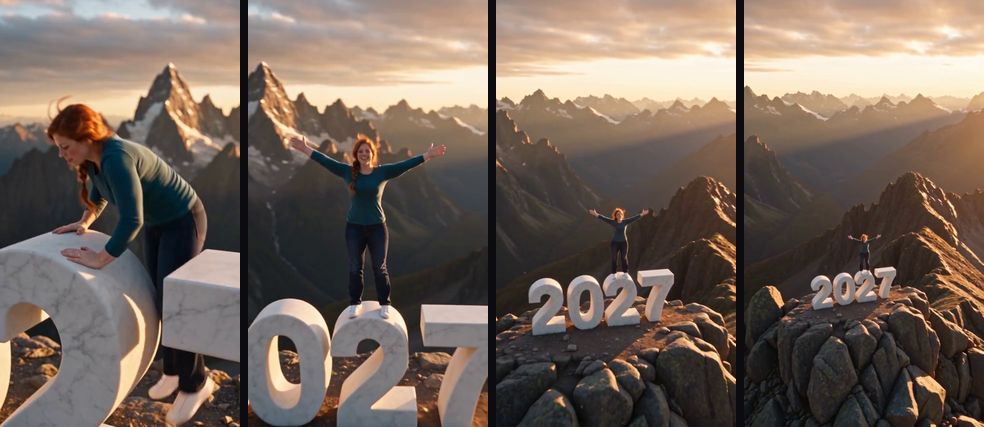
In the AI version, the climber is you. Your face, hair, build and clothes come from your photo; the numbers, the mountains, the sunset, the camera move and the sound come from the clip.
Where does the giant 2027 numbers idea come from?
Giant year numbers are one of the oldest New Year images there is. In New York, the numerals for the coming year are a ritual of their own: according to the Times Square Alliance, the seven-foot-tall numbers go on show on a Broadway plaza about two weeks before New Year's Eve and are then lifted to the roof of One Times Square, where they light up at midnight. Local news, such as FOX 5 New York, covers their arrival each December.
The Hello 2027 videos online take that picture somewhere bigger. Instead of standing next to the numbers in a crowd, you climb them on an empty mountain top, alone with the sunset. Creators made versions with one person, with two people and with a dog, all in the same mountain scene. This effect follows the one-person version. It borrows only the idea of giant year numbers; this site is not affiliated with Times Square, its organisers or any New Year's Eve event.
What happens in the 2027 clip, second by second?
The whole clip is one continuous shot with no cuts, so the camera move does most of the work. Knowing what happens when helps you choose a photo and a caption.
| Time | What you see |
|---|---|
| 0–1.5 s | Close-up: you climb onto the marble numbers, face clearly in view |
| 1.5–3 s | You stand on top of the 2027 as the camera starts to pull back |
| 3–4 s | You straighten up and throw both arms wide |
| 4–6 s | Wide shot: the full 2027 on the summit, peaks and sunset, you small on top |
The first second and a half is the only real close-up, so that is where your face does the most work. By the last two seconds you are a small figure against a huge sky, and people recognise you by your hair colour, outfit and build. The sound runs for the whole clip and is already in the file, so you don't need to add music to post it.
Will the 2027 New Year AI video actually look like me?
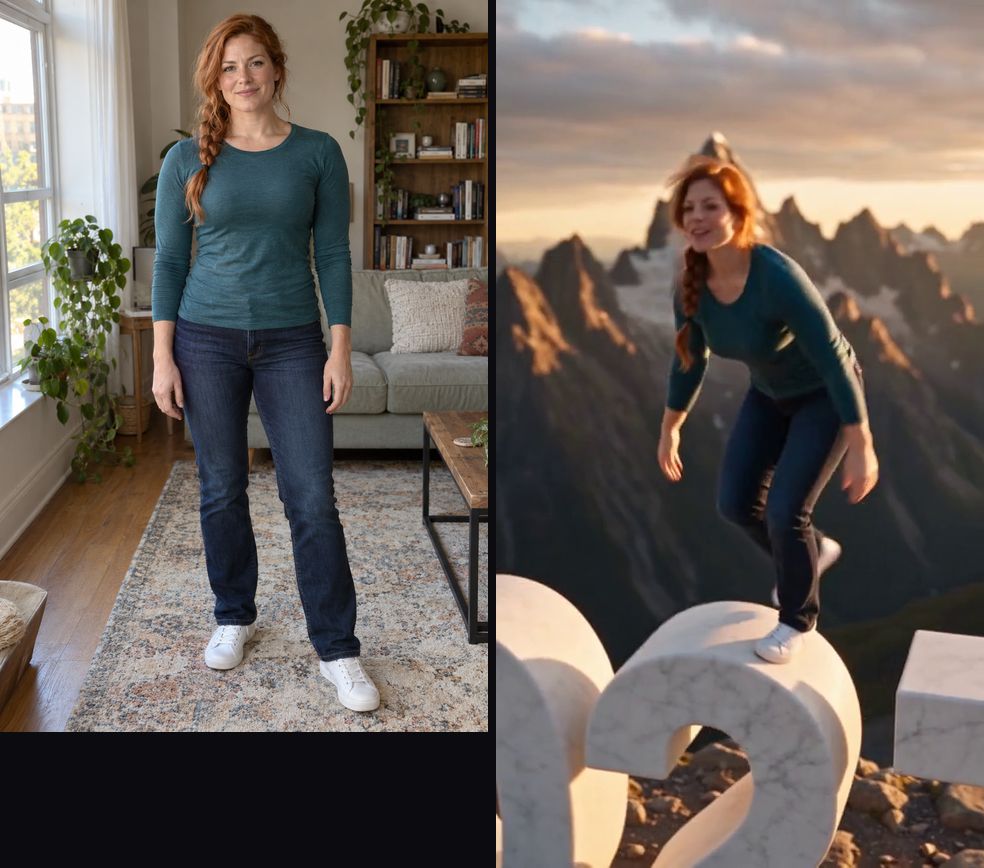
Yes. Your face, hairstyle, hair colour, skin tone, build and the clothes from your photo carry through the climb, the turn to the camera and the wide shot. The marble numbers keep reading 2027, and the ridge and the sunset light stay as they are in the clip.
The example at the top of this page was made with this effect from a photo of an AI-generated, fictional adult. It is not the original clip and it is not edited; it is the full 6-second video. Notice that the teal top, the jeans and the white sneakers came straight from the photo, while the background of the photo (a living room) is dropped completely.
What comes from your photo and what stays from the clip:
| Stays from the clip | Comes from your photo | May vary between runs |
|---|---|---|
| The four marble numbers reading 2027 | Face, hairstyle and hair colour | Exact hand placement on the stone |
| The mountain ridge, snow and rocks | Skin tone and build | How wide your arms open |
| The sunset light and the long camera pull-back | Your clothes and shoes | Small details on the far peaks |
| The 6-second length and the sound | Glasses, beard or braids | How the light catches your hair |
How do I make a Hello 2027 video without filming it?
Upload one photo on this page and press Generate, and 2027 New Year AI puts you on top of the numbers, so you skip the trip to a mountain, the drone for the pull-back shot and the giant marble numbers you would otherwise have to build.
Which photo works best for the 2027 New Year AI video?
A sharp, front-facing photo of one adult, standing, from the knees up or full body, works best. The opening close-up needs a clear face, and the wide ending needs your outfit and build, so a photo that shows both is ideal.
| Photo | What usually happens |
|---|---|
| Full body or knee-up, standing, facing the camera | Best match: you are recognisable from the close-up to the wide shot |
| Close-up selfie | The face is right in the climb; your clothes and shoes are guessed |
| Bright, distinctive outfit | Easy to spot when you are small on the ridge |
| Long coat or very loose clothes | The climb and the open arms read less clearly |
| Group photo | The AI may pick the wrong person; crop to one |
When and how should you post a 2027 New Year video?
Post it as your New Year greeting. The clip is short and positive, so it works best with a caption that says what you are leaving behind or climbing towards.
- Countdown post. Share it in the last days of December with "almost there" or a days-left counter, then post the full version on January 1.
- End of a year-in-review. Put it after a 2026 photo dump as the final clip, so the year ends with you on top of the next one.
- Name a goal. "Climbing into 2027 with one plan: finish the marathon" turns the arms-open moment into a resolution.
- New Year card. Send it to family or a group chat instead of a static card; the sound is already in the file.
- Want another way to celebrate? Dame Hombro AI dance is a one-photo party dance, and Tiny Desk AI gives a group a laughing desk concert.
Price
480p costs 100 credits and 720p HD costs 200 credits. The $9.99 starter pack covers one 480p video.
No credits needed: pay for just this video from $9.99, once. Your first 480p video is $4.99.
Compare packs and plans →Good to know
- 480p is enough for a story or a group chat; 720p keeps faces sharper in close-ups and full-body shots, which is worth it for public posts.
- The sound is already in the MP4 and the moves are timed to it, so keep the original audio when you post.
- If the face drifts, try a sharper photo with even front light and nothing covering the eyes. Crop group photos to one person.
- A failed generation returns its credits automatically. If a video finishes but looks wrong, contact support with the video link.
- TikTok, YouTube and Instagram ask creators to label realistic AI video. Turn on the AI label when you post.
- Your photos are deleted after 7 days, and the video has no extra watermark.
Frequently asked questions
What is the 2027 New Year AI video?
An AI video effect that puts the person in your photo on top of giant marble 2027 numbers on a mountain peak at sunset: you climb up, stand on the numbers and open your arms while the camera pulls away, in one continuous shot with the sound in the file.
Is it the same as a Hello 2027 video?
Yes, it is one take on the Hello 2027 idea: a short clip that greets the new year with the number itself in the shot. This version uses a sunset mountain ridge rather than a city or fireworks.
Do the numbers really say 2027?
Yes. The four marble numbers read 2027 in the clip and stay that way in your video; they are part of the scene, not something you type in.
Do I keep my own clothes?
Yes. You climb in the outfit from your photo. The numbers, the rocks and the sunset light come from the clip.
Can two people or my dog do it?
Not yet. Two-person and pet versions are popular variations of the trend, but only the one-person version has been tested here, so it is the only one offered.
How long is the video?
6 seconds, vertical 9:16, one continuous shot with the sound already in the file.
Which photo works best?
A sharp, front-facing full-body or knee-up photo of one adult. The clip starts close on your face but ends with you tiny on the ridge, so your outfit and build carry your likeness at the end.
Is this connected to Times Square or any New Year event?
No. The effect only borrows the idea of giant year numbers. This site is not affiliated with Times Square, its organisers or any New Year's Eve event.
When should I post it?
Anywhere from the last week of December to the first days of January. It also works as a countdown post, a year-in-review ending or a New Year card for friends and family.
Inspired by the Hello 2027 New Year video trend. Not affiliated with any New Year event or organiser.
Sources
Last updated 2026-11-02
More effects
Bulin 47 AI
Step into the Bulin 47 freestyle crowd with one photo.
Photos: 1 · from 100 credits
Burning Bridges AI
Take the yellow-shirt spot in the Burning Bridges party video.
Photos: 1 · from 100 credits
Crazy Frog AI Chase
Two photos, one invisible-motorcycle chase across five scenes.
Photos: 2 · from 100 credits
ABCDEFG I Need Money AI
Rap the alphabet, then point at the camera and ask for money.
Photos: 1 · from 100 credits