AI Doorbell Video Generator – Pull Faces Into a Fisheye Doorbell Cam
AI Doorbell Video turns one photo into a doorbell camera clip: on a sunny porch you dance your way up to the doorbell camera, press your face right into the fisheye lens, then open your mouth wide, pout and pull faces while the lens stretches your nose and cheeks. Your face, hair and clothes come from the photo, the porch, the moves and the sound come from the clip, and you get a 15-second vertical MP4.
AI Doorbell Video at a glance
- Photos needed
- 1 · Your photo
- Video length
- About 15 seconds
- Format
- Vertical 9:16 MP4, 480p or 720p
- Sound
- Silent, so you can add your own music
- Credits per video
- 100–200 credits (from $9.99)
- Typical wait
- 3–10 minutes; you can close the page
- Privacy
- Photos deleted after 7 days, videos after 30, visible only to you
How do you make your own AI Doorbell Video video?
- 1
Upload one photo of an adult with the face clearly visible. A half-body photo works best, because most of the clip is a close-up of your face and top.
- 2
Pick 480p (100 credits) for a quick post, or 720p (200 credits) for a sharper face in the fisheye close-ups.
- 3
Press Generate, then download the 15-second MP4 with the sound from My videos.
What does the AI doorbell video look like?
The AI doorbell video is a 15-second vertical clip shot from a doorbell camera mounted by a front door: a fixed fisheye view of a sunny porch with a railing, a roof overhang and houses in the distance. The person starts at the far end of the porch, dances their way up to the camera, and then presses their face right into the lens. From there it is all close-ups: a wide-open mouth, a pout, raised eyebrows and squinting eyes, while the fisheye stretches the nose and cheeks into the kind of face only a doorbell camera can make.
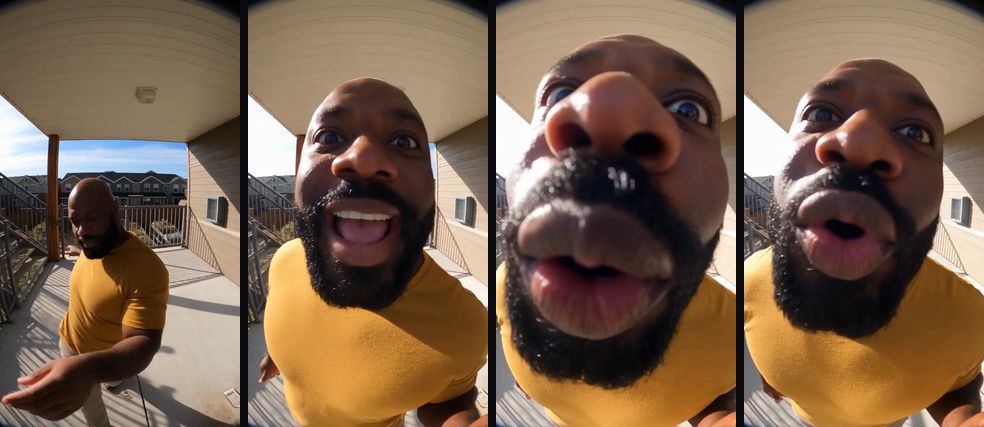
In the AI version, the visitor is you. Your face, hair and clothes come from your photo; the porch, the fisheye lens, every move and the timing come from the clip, and the sound plays over the top.
Where does the AI doorbell video trend come from?
AI doorbell videos borrow the look of home-security footage: a fixed, wide-angle camera, a porch or a garden, and something unexpected happening in front of it. The format went mainstream in July 2025 with an AI-generated clip of bunnies bouncing on a backyard trampoline at night, styled as security-camera footage. Know Your Meme documents how it spread on TikTok, and PetaPixel reported how many viewers took it for a real clip before it was revealed as AI.
Since then, "caught on my doorbell" has become its own genre of AI video: animal visitors, strange delivery drivers and, in this version, a friend who walks up to the camera and squishes their face into the lens. The fisheye close-up is the hook, because everyone knows how unflattering a doorbell camera is up close. This site is not connected to any doorbell brand, creator or app, and the video doesn't use anyone else's likeness.
Will the AI doorbell video actually look like me?
Yes. You get the 15-second doorbell clip with you as the visitor: your face, hairstyle, skin tone, beard or glasses and clothes come from your photo and hold through the walk-up and every fisheye close-up. The porch, the lens distortion and each face you pull follow the clip, and the sound is already in the file.
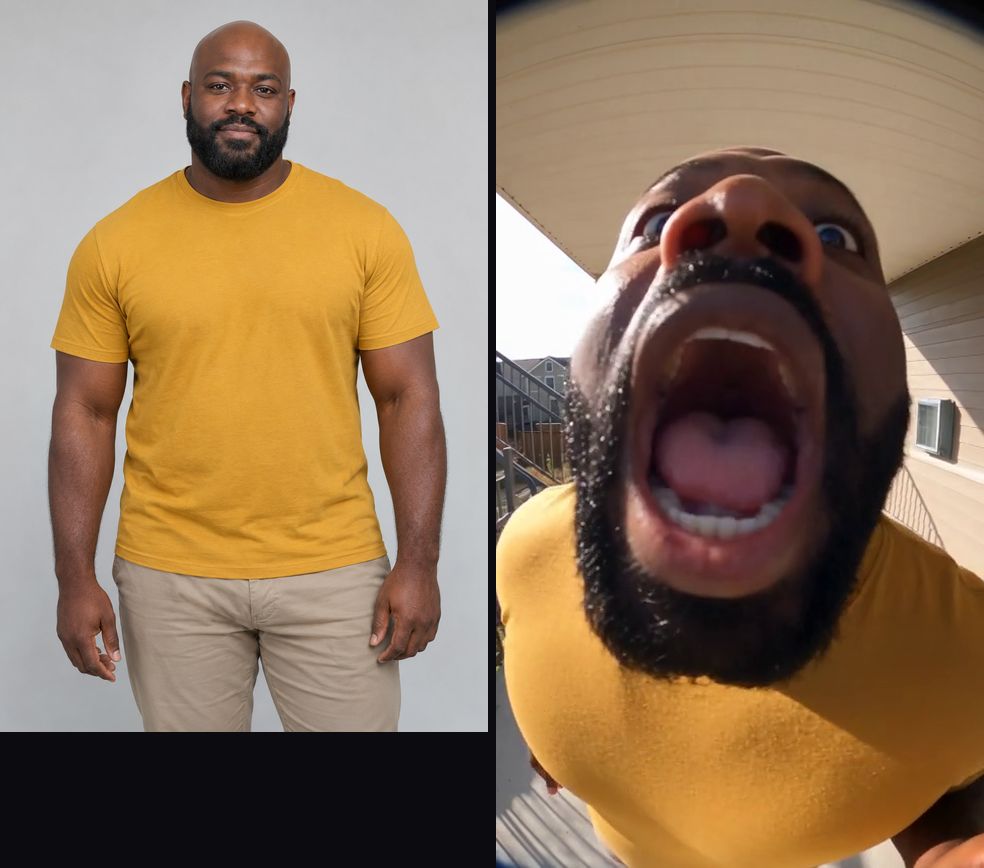
The example at the top of this page was made with this effect from a photo of an AI-generated, fictional man with a shaved head and a full beard, a look that is nothing like the original performer. It is not the original clip and it is not edited. It shows the first 10 seconds; the video you get is the full 15 seconds, with more close-up faces at the lens at the end. When the face is pressed right against the lens it fills the frame and the features stretch, exactly as in a real doorbell clip, and they settle back as soon as you pull away. Most videos are ready in a few minutes, and you can close the page while it renders.
How do I do the AI doorbell video trend without filming it?
Upload one photo on this page and press Generate. The AI doorbell video generator recreates the clip with you in it in a few minutes, so you skip borrowing a doorbell camera, finding a sunny porch and pressing your face into a lens take after take. Compared with filming it yourself or using an editing-app template, you get:
- No camera, no porch, no retakes. One photo puts you on the porch and in front of the fisheye lens.
- The sound is already synced. The audio is part of the MP4, so every face lands on time without editing.
- What you see is what you get. The example on this page was made with this effect, not borrowed from the original clip.
- Pay per video, refunded if it fails. The price is shown before you press Generate, and a confirmed failed generation returns its credits automatically.
- Private and clean. Your photo is deleted after 7 days, and the MP4 has no extra watermark.
Which photo works best for an AI doorbell video?
A sharp, evenly lit half-body photo of one adult, face fully visible, works best. Most of the clip is an extreme close-up that fills the frame with your face, so the face is what matters; your top is visible in the walk-up and below your chin in the close-ups.
| Photo | What usually happens |
|---|---|
| Half body, face visible, even light | Best match: face, hair and clothes hold from the walk-up to the lens |
| Close-up selfie | The face is right; clothes and the walk-up are guessed |
| Sunglasses or a cap low over the eyes | The eyes are harder to keep in the close-ups |
| Heavy filter or beauty mode | Features may come out smoothed or changed |
| Group photo | The AI may pick the wrong person; crop to one |
The funnier the contrast, the better: a photo of your most composed friend, a formal work headshot or a serious passport-style photo makes the fisheye faces land harder.
480p or 720p for an AI doorbell video?
Both are 15 seconds. 480p costs 100 credits and is enough for a story or a group chat. 720p costs 200 credits and is worth it if you plan to post publicly, because the close-ups show your face filling the whole frame and the extra detail keeps skin, beard and eyes sharp.
How much does an AI doorbell video cost?
One video is 100 credits at 480p or 200 at 720p. The $9.99 starter pack covers one 480p video, and the $19.99 pack (220 credits) covers one in 720p. If you want one for every friend, the $49.99 pack (600 credits) gives six 480p videos or three in 720p. Credits from packs never expire, and a confirmed failed generation returns its credits automatically.
How do you post an AI doorbell video so it lands?
- Caption it like a doorbell alert. "Motion detected at front door" or "who is this at my door" sets up the joke before the face arrives.
- Keep the original sound. The faces are timed to it; swapping the audio breaks the rhythm.
- Make a set. Generate the same clip from several friends' photos and post them as "everyone who visited this week".
- Want another one-photo meme? The Angry Dance Filter AI effect puts you in a kitchen, ranting and shouting straight at the camera.
- Label it. TikTok, YouTube and Instagram ask creators to label realistic AI video. Turn on the platform's AI label when you post, and don't present it as real security footage.
What stays the same, and what may vary?
| Stays from the clip | Comes from your photo | May vary between runs |
|---|---|---|
| The porch, railing and sunlight | Face, hairstyle and hair colour | Exact expression on each beat |
| The fisheye lens and its distortion | Skin tone, beard and marks | How far the nose and cheeks stretch |
| The walk-up and every face you pull | Your clothes and their colours | Small details of the house siding |
| The 15-second length and the sound | Glasses, if the photo has them | Fine details of hands near the lens |
What if the AI doorbell video looks off?
If your face drifts in the close-ups, try a sharper photo with even front light and nothing covering your eyes. If the AI picks up someone else from the photo, crop it to just you. If your clothes don't match, use a photo where your top is clearly visible. If the face looks soft, the 720p option usually helps. If the generation fails, the credits come back automatically. If it finishes but looks wrong, contact support with the video link.
Price
480p costs 100 credits and 720p HD costs 200 credits. The $9.99 starter pack covers one 480p video.
Compare packs and plans →Frequently asked questions
What is an AI doorbell video?
A short clip that looks like it was recorded by a front-door doorbell camera: a fixed, wide fisheye view of a porch, with someone walking up to the lens. This AI doorbell video generator puts the person in your photo into that shot, pulling faces into the camera.
What happens in this doorbell video?
You dance across a sunny porch toward the doorbell camera, lean in until your face fills the frame, then open your mouth wide, pout, squint and pull faces while the fisheye lens stretches your nose and cheeks. It ends with more close-up faces at the lens.
Do I need a real doorbell camera?
No. You only upload a photo. The porch, the fisheye lens, the moves and the sound all come from the reference clip, so no camera, porch or filming is needed.
Will my face still look like me when it is stretched by the fisheye?
Yes. The lens distorts every face that gets that close, which is the joke, but your features, skin tone, hair and beard or glasses come from your photo and stay recognisable through the close-ups.
Will I wear my own clothes?
Yes. Your face, hair and clothes come from your photo. The porch, railings, sunlight and fisheye framing come from the clip.
How long is the video?
15 seconds, vertical 9:16, with the sound already in the file. The example on this page shows the first 10 seconds of that clip.
Which photo works best?
A sharp, evenly lit half-body photo of one adult, face fully visible and looking roughly at the camera. Most of the clip is an extreme close-up, so a clear face matters more than a full-body shot.
Can I use a photo of a pet or a child?
This version is made for one adult. Photos of children are not accepted, and a pet photo is not supported in this effect yet.
Is there a free AI doorbell video generator here?
No. Watching the example is free, but every video runs on a paid AI video model, so it uses credits. The cheapest option is 100 credits for a 480p video, which is the $9.99 pack. Confirmed failures are refunded automatically.
Can I post it as real doorbell footage?
Please don't. Present it as the joke it is and turn on the platform's AI label. Fake security clips have fooled millions of viewers before, and passing an AI clip off as real footage can mislead people.
Inspired by the AI doorbell camera video trend. Not affiliated with any doorbell brand, creator or app.
Sources
Last updated 2026-10-28
More effects
Bulin 47 AI
Step into the Bulin 47 freestyle crowd with one photo.
Photos: 1 · from 100 credits
Burning Bridges AI
Take the yellow-shirt spot in the Burning Bridges party video.
Photos: 1 · from 100 credits
Crazy Frog AI Chase
Two photos, one invisible-motorcycle chase across five scenes.
Photos: 2 · from 100 credits
ABCDEFG I Need Money AI
Rap the alphabet, then point at the camera and ask for money.
Photos: 1 · from 100 credits