BABYMONSTER DESERVE AI – Your Own Rainy Music-Video Breakdown From One Photo
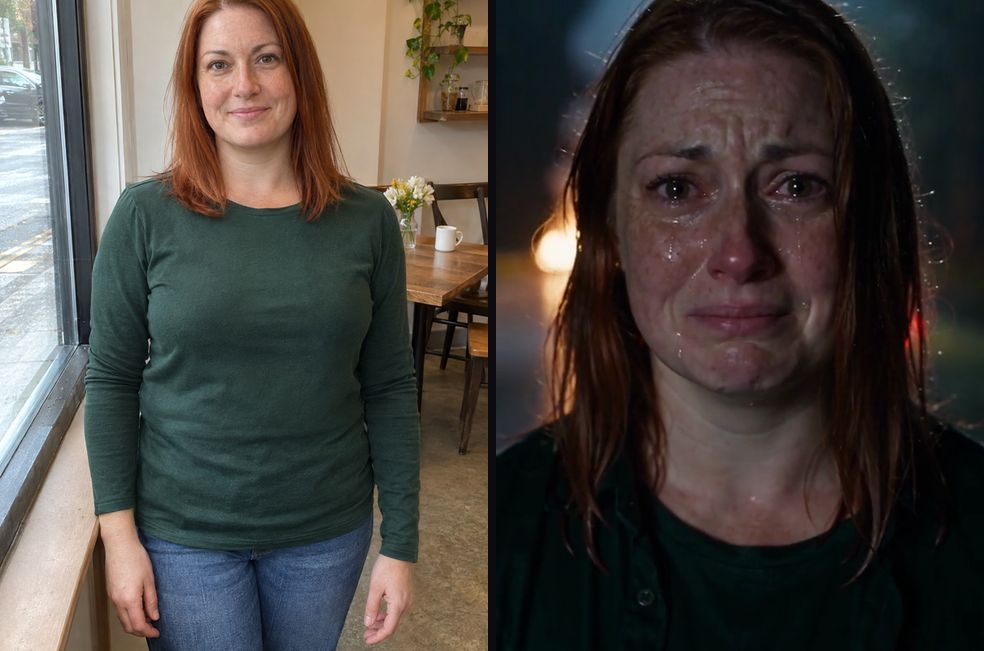
BABYMONSTER DESERVE AI turns one photo into a heartbreak music-video scene: on a rain-soaked road at night, with a car burning in the distance behind you, you walk slowly toward the camera, run a hand through your wet hair, look up, and the camera pushes in until your face fills the frame, red-eyed and in tears. Your face, hair, build and outfit come from your photo, the rain, the burning car, the camera move and the sound come from the clip, and you get a 10-second, roughly 3:4 MP4.
BABYMONSTER DESERVE AI at a glance
- Photos needed
- 1 · Your photo
- Video length
- About 10 seconds
- Format
- Portrait 3:4 MP4, 480p or 720p
- Sound
- Original soundtrack added
- Credits per video
- 40–90 credits
- Typical wait
- 3–10 minutes; you can close the page
- Privacy
- Photos deleted after 7 days, videos after 30, visible only to you
How do you make your own BABYMONSTER DESERVE AI video?
- 1
Upload one clear, front-facing photo of one adult, ideally half-body or full-body.
- 2
Pick 480p for a quick post, or 720p if you want the rain and the tears sharper in the close-up.
- 3
Press Generate, then download the 10-second MP4 with the sound from My videos.
What does the BABYMONSTER DESERVE AI video look like?
The BABYMONSTER DESERVE AI video is a 10-second heartbreak scene filmed at night in heavy rain. It starts wide: you walk slowly down a wet, empty road toward the camera, head down, while behind you a car sits with its taillights glowing red and flames and smoke rising from the wreck. You push a hand through your soaked hair, look up, and the camera keeps moving in, from a full-body shot to your shoulders to a tight close-up, until the last frames are just your face, red-eyed, rain and tears running down your cheeks.
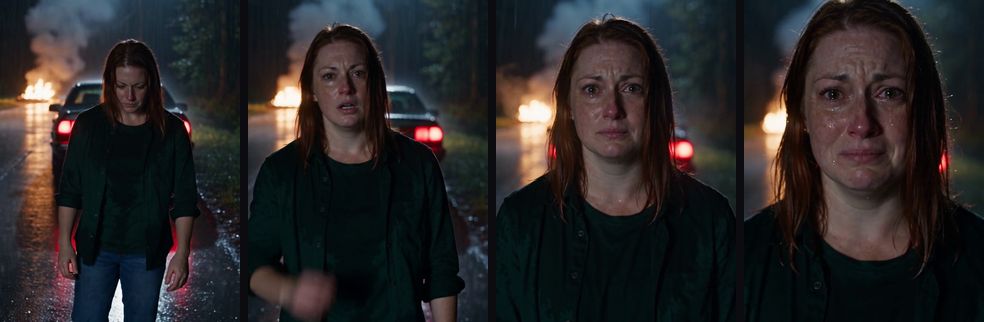
In the AI version, the person in the rain is you. Your face, hair, build and outfit come from your photo; the rain, the road, the burning car, the camera move and the sound come from the clip.
Where does the BABYMONSTER DESERVE trend come from?
The BABYMONSTER DESERVE trend follows the release of a ballad. According to The Korea Times, YG Entertainment's girl group BABYMONSTER returned in October 2026 with "DESERVE", a slow-tempo single. Its emotional music video took off fast: Sports Kyunghyang reported it passing 100 million YouTube views, the group's 19th video to do so.
Fans answer emotional songs like this with their own sad, cinematic clips, and AI made that easy: one photo, one rainy night, one tearful close-up. The rain scene here is a fan-made format in the mood of the song, not a recreation of the music video. This site is not affiliated with BABYMONSTER, YG Entertainment or the song owners, and the video doesn't use the members' likeness.
What happens in the BABYMONSTER DESERVE clip, second by second?
The BABYMONSTER DESERVE clip is a single slow push-in, so the drama builds just from the camera getting closer.
| Time | Shot | What you do |
|---|---|---|
| 0–2 s | Wide, full body | Walk toward the camera in the rain, head down |
| 2–3.5 s | Wide to medium | Push a hand through your wet hair |
| 3.5–6 s | Medium | Look up at the camera, lost and hurt |
| 6–8 s | Close | Eyes red, rain running down your face |
| 8–10 s | Extreme close-up | Tears and a trembling mouth fill the frame |
The burning car stays in the background the whole time, slowly going out of focus as the camera gets close. It is never explained, which is exactly what makes the scene feel like the end of a story.
What makes the BABYMONSTER DESERVE AI video feel like a music video?
The look comes from three choices that every sad K-pop and pop music video borrows: night rain, a single light source far behind you, and a camera that moves in slowly instead of cutting. The rain soaks your hair and clothes, the fire and the red taillights backlight you, and the push-in turns a simple walk into a confession.
That is also why the clip works without lyrics on screen. Pair it with a caption, or with the song from the platform's sound library, and it reads as a scene from a story the viewer fills in themselves.
Will the BABYMONSTER DESERVE AI video actually look like me?
Yes. Your face, hairstyle, hair colour, skin tone and build carry through the whole push-in, from the wide shot to the extreme close-up, and the outfit is the one from your photo, soaked by the rain. The road, the burning car and the night lighting come from the clip.
The example on this page was made with this effect from a photo of an AI-generated, fictional adult. It is not the original clip and it is not edited. Her green top and jeans came from the photo; the rain darkened them and the clip's lighting gave them the loose, layered look of a wet shirt.
What comes from your photo and what stays from the clip:
| Stays from the clip | Comes from your photo | May vary between runs |
|---|---|---|
| The rainy road and the burning car | Face, hairstyle and hair colour | How many tears fall |
| The night lighting and red taillights | Skin tone and build | How wet the hair looks |
| The slow push-in and 10-second length | Your outfit, soaked by rain | The exact moment you look up |
| The sound | Glasses, freckles, beard | Small details in the background |
How do I do the BABYMONSTER DESERVE trend without filming it?
Upload one photo on this page and press Generate, and BABYMONSTER DESERVE AI stages the whole rainy scene for you, so you skip standing in the rain at night, setting anything on fire, hiring a camera operator for a smooth push-in and crying on cue.
Which photo works best for the BABYMONSTER DESERVE AI video?
A sharp, front-facing photo of one adult in even light works best, half-body or full-body. The clip starts wide and ends on an extreme close-up, so it needs both your build and a clear face.
| Photo | What usually happens |
|---|---|
| Half or full body, facing the camera | Best match: recognisable from the wide shot to the close-up |
| Close-up selfie | The face is right; your build in the wide shot is guessed |
| Sunglasses or a cap | Hides the eyes the final close-up is built on |
| Heavy filter or makeup effect | The close-up can look less like you in plain light |
| Group photo | The AI may pick the wrong person; crop to one |
How do you post a BABYMONSTER DESERVE AI video?
Post it as a mood. The clip has no words, so the caption decides what the tears are about.
- Dramatic for nothing. "When they say the café is out of my order" turns the heartbreak into a joke.
- Real feelings. A breakup, a goodbye or a long week; the scene does the talking.
- Add the song. Pick DESERVE or another ballad from the platform's sound library when you post.
- Want another emotional clip? Deep Down in My Heart AI is a tearful interview starring your pets, and Jisoo Addicted AI is a K-pop duet on a rooftop.
Price
This 10-second clip costs 40 credits in 480p and 90 credits in 720p HD. Credits are charged per second of video.
No credits needed: pay for just this video from $9.99, once. Your first video is $4.99.
Compare packs and plans →Good to know
- 480p is enough for a story or a group chat; 720p keeps faces sharper in close-ups and full-body shots, which is worth it for public posts.
- The sound is already in the MP4 and the moves are timed to it, so keep the original audio when you post.
- If the face drifts, try a sharper photo with even front light and nothing covering the eyes. Crop group photos to one person.
- A failed generation returns its credits automatically. If a video finishes but looks wrong, contact support with the video link.
- TikTok, YouTube and Instagram ask creators to label realistic AI video. Turn on the AI label when you post.
- Your photos are deleted after 7 days, and the video has no extra watermark.
Frequently asked questions
What is BABYMONSTER DESERVE AI?
An AI video effect that puts the person in your photo into a short, cinematic heartbreak scene in the rain, the kind of moody shot people pair with the DESERVE ballad, ending in a tearful close-up, with the sound already in the file.
What is DESERVE?
"DESERVE" is a slow-tempo single by the YG Entertainment girl group BABYMONSTER, released on October 23, 2026, together with an emotional music video.
Is this the official music video?
No. The rain scene is a fan-made AI format. This site is not affiliated with BABYMONSTER, YG Entertainment or the song owners, and the video doesn't use the members' likeness.
Will the BABYMONSTER song play in my video?
Your video carries the sound of the clip it is based on. If you want the DESERVE song itself, add it from the platform's sound library when you post.
Do I keep my own clothes?
Yes. You wear the outfit from your photo, soaked by the rain. The road, the burning car and the lighting come from the clip.
How long is the video and what shape is it?
10 seconds, in one continuous shot, roughly 3:4 portrait. On TikTok or Reels it shows with a little space above and below, or you can crop it to 9:16.
Are the tears real?
No. The red eyes and tears are added as an expression; nobody has to cry for the photo.
Which photo works best?
A sharp, front-facing photo of one adult in even light, half-body or full-body, with your face and hair clearly visible. The video ends on a very close shot of your face.
Can I use a photo of a BABYMONSTER member?
No. Only use photos of yourself or adults who agreed to it; the effect is for putting yourself into the scene, not for recreating real artists.
Inspired by the BABYMONSTER DESERVE video trend. Not affiliated with BABYMONSTER, YG Entertainment or the song owners, and the video does not use the members' likeness.
Sources
Last updated 2026-11-10
More effects
Bulin 47 AI
Step into the Bulin 47 freestyle crowd with one photo.
Photos: 1 · from 60 credits
Burning Bridges AI
Take the yellow-shirt spot in the Burning Bridges party video.
Photos: 1 · from 60 credits
Crazy Frog AI Chase
Two photos, one invisible-motorcycle chase across five scenes.
Photos: 2 · from 56 credits
ABCDEFG I Need Money AI
Rap the alphabet, then point at the camera and ask for money.
Photos: 1 · from 36 credits