Toy Car to Real Car AI – Shrink Your Car Onto a Train Window, Then Let It Drive Off
Toy Car to Real Car AI turns one photo of a car into the train-window transformation: your car sits as a tiny toy on the ledge of a moving train at sunset, the train enters a tunnel, the toy's taillights glow red, the window frame melts away and the toy grows into the full-size car driving down the tunnel road. The car's shape, colour, wheels and lights come from your photo, the train window, the tunnel, the camera move and the sound come from the clip, and you get a 10-second vertical MP4.
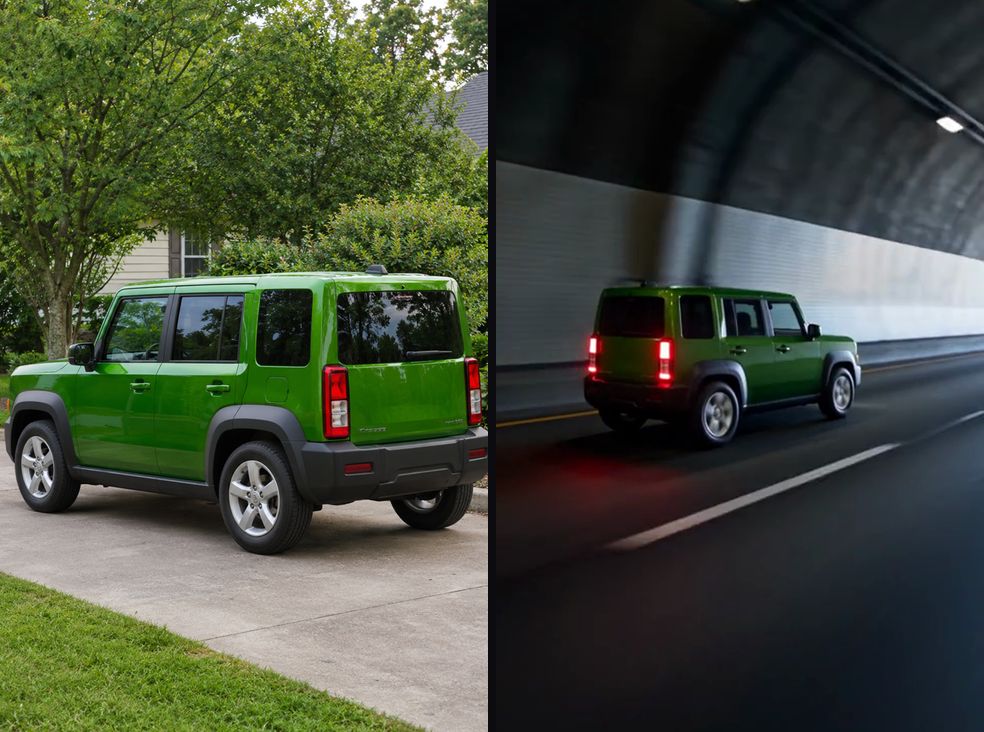
Toy Car to Real Car AI at a glance
- Photos needed
- 1 · Your car
- Video length
- About 10 seconds
- Format
- Vertical 9:16 MP4, 480p or 720p
- Sound
- Original soundtrack added
- Credits per video
- 40–90 credits
- Typical wait
- 3–10 minutes; you can close the page
- Privacy
- Photos deleted after 7 days, videos after 30, visible only to you
How do you make your own Toy Car to Real Car AI video?
- 1
Upload one clear photo of the car, ideally from the side or a rear three-quarter angle, with the whole car in frame.
- 2
Pick 480p for a quick post, or 720p for sharper paint and wheels in the final tunnel shot.
- 3
Press Generate, then download the 10-second MP4 with the sound from My videos.
What does the Toy Car to Real Car AI video look like?
The Toy Car to Real Car AI video is a 10-second vertical clip shot from inside a moving train. It opens on a pink and orange sunset sliding past the window, with your car sitting on the window ledge as a palm-sized toy. The train dives into a tunnel, the light outside drops away and only the ceiling lamps flash past. Then the toy's taillights switch on and glow red on the ledge, the window frame quietly disappears around it, and the toy keeps growing until it is the real, full-size car, driving down a lit tunnel road while the camera follows from behind.
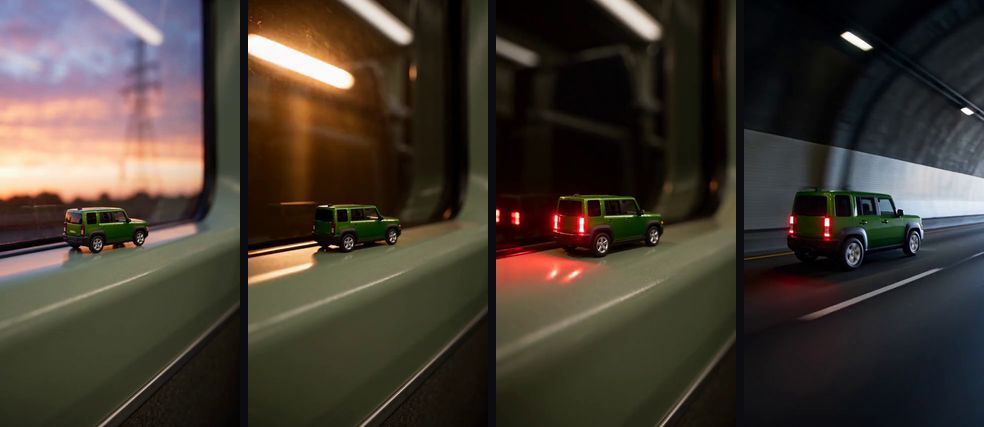
In the AI version, the car is yours. Its body shape, colour, wheels and lights come from your photo, both as the toy and as the full-size car; the train window, the sunset, the tunnel, the camera move and the sound come from the clip.
Where does the toy car to real car trend come from?
The toy car to real car trend plays on something car fans already love: tiny scale copies of real cars. As Wikipedia's article on die-cast toys explains, die-cast models are small metal replicas of real vehicles, made in standard scales and collected by adults as much as children, which is why a toy version of a real car instantly reads as "that car, but small".
The short-video version turns that into a reveal. A miniature of a car sits on a train window ledge, the tunnel darkness hides the trick, and the car comes out the other side full size. It works especially well for people showing off a new or dream car, because the toy and the real car are clearly the same model. This site is not affiliated with any toy brand or carmaker, and the video doesn't show logos or plates.
What happens in the Toy Car to Real Car clip, second by second?
The Toy Car to Real Car clip is one continuous shot, and the transformation is spread over the tunnel so it feels like a single smooth trick.
| Time | What you see |
|---|---|
| 0–2 s | Sunset through the train window; your car sits on the ledge as a small toy |
| 2–4 s | The train enters the tunnel; the window goes dark and ceiling lamps flash by |
| 4–6 s | The toy's taillights switch on and throw red light across the ledge |
| 6–8 s | The window frame fades out and the toy grows to full size |
| 8–10 s | The real car drives down the lit tunnel road, seen from behind |
The best moment to pause on is the second the taillights switch on, while it is still clearly a toy; the full-size reveal right after is what people rewatch.
Which car photo works best for Toy Car to Real Car AI?
A clear photo of the whole car from the side or a rear three-quarter angle works best. The toy sits sideways on the window ledge and the real car is seen from behind, so the AI needs to see the car's profile and its taillights.
| Photo | What usually happens |
|---|---|
| Rear three-quarter view, whole car in frame | Best match: profile, taillights and wheels all come through |
| Straight side view | Toy looks right; the rear lights are guessed |
| Front-only view | The rear of the car and the taillights are invented |
| Close-up of one part (wheel, badge) | Not enough of the car to rebuild it |
| Two cars or a busy car park | The AI may pick the wrong car; crop to one |
Bright, distinctive colours like the green SUV in the example look great as a toy. Very dark cars still work, but they blend into the tunnel more in the middle of the clip.
Will the Toy Car to Real Car AI video actually look like my car?
Yes. The car keeps the body shape, colour, wheel design and light shapes from your photo, first as a small toy on the ledge and then as the full-size car in the tunnel, without switching to a different model. The background of your photo, such as a driveway or a street, is not used; the scene is always the train window and the tunnel.
The example on this page was made with this effect from a photo of an AI-generated car, not a real model you can buy. It is not the original clip and it is not edited. Plates and brand badges are left blank in the video, so don't count on your registration or logo showing up.
What comes from your photo and what stays from the clip:
| Stays from the clip | Comes from your photo | May vary between runs |
|---|---|---|
| The train window, ledge and sunset | Body shape and proportions | The exact moment the frame fades |
| The tunnel, ceiling lamps and road | Paint colour and trim | Reflections on the toy's paint |
| The camera move and the 10-second length | Wheel design | Small details of the tunnel walls |
| The sound | Headlight and taillight shapes | How bright the taillights glow |
How do I do the toy car to real car trend without filming it?
Upload one photo of the car on this page and press Generate, and Toy Car to Real Car AI builds the whole trick for you, so you skip hunting for a die-cast model of your exact car, filming on a moving train at sunset and editing a seamless toy-to-real transition.
How do you post a Toy Car to Real Car AI video?
Post it as a car reveal. The clip already does the "it's small, now it's real" joke, so the caption only needs to say what the car means to you.
- New car day. "From toy box to driveway" or "manifested it, then bought it" turns the transformation into a story.
- Dream car board. Use a photo of the car you're saving for and caption it as a goal.
- Before and after. Post it next to a photo of your actual childhood toy car of the same model.
- Want another car clip? Day 1 of Owning a Roadster puts you or your pet behind the wheel, and the Unforgettable car reveal swaps the car in a card-flip moment.
Price
This 10-second clip costs 40 credits in 480p and 90 credits in 720p HD. Credits are charged per second of video.
No credits needed: pay for just this video from $9.99, once. Your first video is $4.99.
Compare packs and plans →Good to know
- 480p is enough for a story or a group chat; 720p keeps the paint, wheels and lights sharper, which is worth it for public posts.
- The sound is already in the MP4 and the moves are timed to it, so keep the original audio when you post.
- If the car changes shape or colour, try a sharper photo of the whole car from the side or a rear three-quarter angle, in daylight. Crop out other cars.
- A failed generation returns its credits automatically. If a video finishes but looks wrong, contact support with the video link.
- TikTok, YouTube and Instagram ask creators to label realistic AI video. Turn on the AI label when you post.
- Your photos are deleted after 7 days, and the video has no extra watermark.
Frequently asked questions
What is the Toy Car to Real Car AI video?
An AI video effect that shows your car as a small model on a train window ledge, then grows it into the real, full-size car driving through a tunnel, in one continuous 10-second shot with the sound in the file.
Do I need a photo of a person?
No. This effect replaces the car, not a person. Upload a photo of the car you want to see; there are no people in the video.
Can I use a photo of my own car?
Yes. A photo of your own car is the most common use: a new purchase, a restored classic or a dream car you just picked up. It also works with a photo of a car you are saving for.
Does the toy look like my car?
Yes. The toy is a scaled-down version of the car in your photo, with the same body shape, colour, wheels and light shapes, and it keeps them when it turns into the real car.
Which angle should my car photo be?
A side view or a rear three-quarter view works best, because the toy sits sideways on the ledge and the real car is seen from behind with its taillights on.
How long is the video?
10 seconds, vertical 9:16, one continuous shot with the sound already in the file.
Will the number plate or badges show?
The video avoids readable plates and brand logos, so your plate number won't appear, and badges may be smoothed out.
Can I use a photo of a toy car instead?
It is made for photos of real cars. A photo of a model car can work, but the full-size car at the end will look like a blown-up version of the toy.
Is this connected to Hot Wheels or a carmaker?
No. This site is not affiliated with any toy brand or carmaker; the effect simply uses the look of a small die-cast model.
Inspired by the toy car to real car video trend. Not affiliated with any carmaker or toy brand.
Sources
Last updated 2026-11-09
More effects
Day 1 of Owning a Roadster
Replace the golden retriever driver with you or your pet.
Photos: 1 · from 52 credits
Unforgettable Car AI
Pick a card, cover the lens, reveal your dream car.
Photos: 1 · from 90 credits
Ali G Driving Scene AI
One photo dances by a yellow supercar, then drives it with full swagger.
Photos: 1 · from 48 credits
Bulin 47 AI
Step into the Bulin 47 freestyle crowd with one photo.
Photos: 1 · from 60 credits