Girls' Generation Gee AI Dance – Do the Gee Crab Dance From One Photo
Girls' Generation Gee AI Dance turns one photo into the Gee dance: in a hallway in front of a wooden door, you frame your face with your hands, wave, clutch your heart and then do the famous crab-leg step with your hands on your hips, in a comedy tweed suit and shorts. Your face, hair and build come from the photo, the moves and the sound come from the clip, and you get a 12-second vertical MP4.
Girls' Generation Gee AI Dance at a glance
- Photos needed
- 1 · Your photo
- Video length
- About 12 seconds
- Format
- Vertical 9:16 MP4, 480p or 720p
- Sound
- Silent, so you can add your own music
- Credits per video
- 100–200 credits (from $9.99)
- Typical wait
- 3–10 minutes; you can close the page
- Privacy
- Photos deleted after 7 days, videos after 30, visible only to you
How do you make your own Girls' Generation Gee AI Dance video?
- 1
Upload one photo of an adult with the face visible. Half or full body works best, because the whole body is in the frame.
- 2
Pick 480p (100 credits) for a quick post, or 720p (200 credits) for a sharper face at full-body distance.
- 3
Press Generate, then download the 12-second MP4 with the sound from My videos.
What does the Girls' Generation Gee AI dance video look like?
The Girls' Generation Gee AI dance is a 12-second vertical clip filmed in one fixed shot in a narrow hallway: white walls, a wooden floor and a closed wooden door behind the dancer. The dancer wears a comedy tweed outfit, a jacket with a tie, knee-length shorts and boots, and runs through the best-known Gee moves: hands framing the face, a shy cover of the mouth, both hands waving, a dreamy hand-on-heart with eyes closed, and then the crab-leg step with hands on hips, knees bent, swaying side to side while the head tilts with the beat.
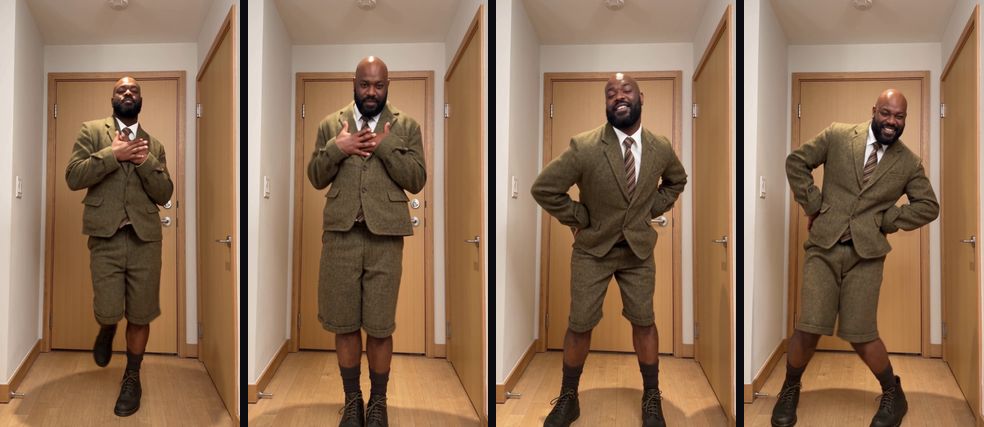
In the AI version, the dancer is you. Your face, hairstyle and build come from your photo; the hallway, the tweed outfit, every gesture and the timing come from the clip, and the sound plays over the top.
Where does the Gee dance come from?
Gee is the 2009 hit by the K-pop group Girls' Generation (SNSD). According to Wikipedia, the song held number one on KBS Music Bank for a record nine consecutive weeks, a run that stood until 2012, and one part of its choreography, which fans nicknamed the crab-leg dance, became hugely popular with the public. STEEZY describes the Gee video as one of the most viewed K-pop music videos of the 2000s and breaks down the signature move: hands on hips, knees bent, stepping side to side in time with the "gee gee gee" hook.
That move is why Gee keeps coming back as a cover and a meme: it is instantly recognisable, easy to read on a small screen and funny when someone unexpected does it with total commitment. This effect follows a comedy cover of the dance, which is why the outfit is a tweed suit rather than a stage costume. Girls' Generation and their label are not connected to this site, and the video does not use any member's likeness.
Will the Girls' Generation Gee AI dance video actually look like me?
Yes. You get the 12-second Gee dance with you as the dancer: your face, hairstyle, skin tone and build come from your photo and hold through the hand gestures, the fast arm swings and the crab-leg step. The hallway, the tweed outfit and every move follow the clip, and the sound is already in the file, so each step lands on the beat. The original performer's wig and moustache are not copied; your own hair, or lack of it, stays.
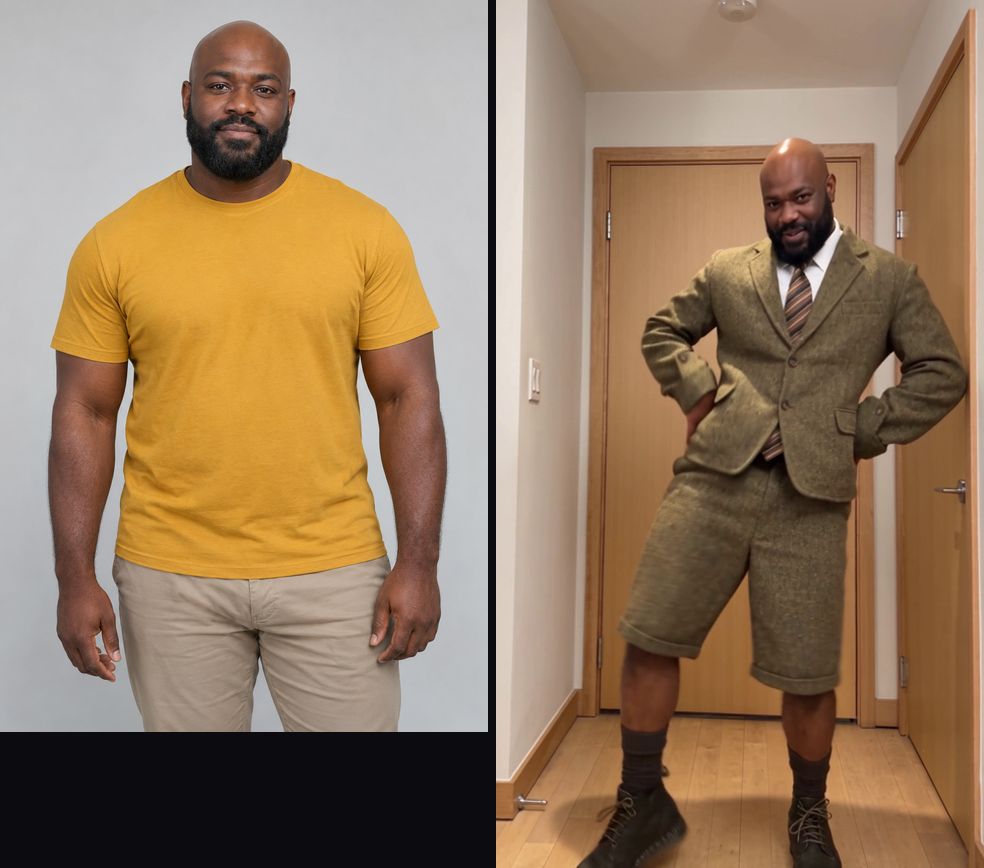
The example at the top of this page was made with this effect from a photo of an AI-generated, fictional man with a shaved head and a full beard, a look that is nothing like the original performer. It is not the original clip and it is not edited. It shows seconds 2 to 12 of the dance; the video you get is the full 12 seconds and also includes the opening face-framing gesture. Fast arm swings can show a little motion blur, just as they do in the original. Most videos are ready in a few minutes, and you can close the page while it renders.
How do I do the Girls' Generation Gee dance without filming it?
Upload one photo on this page and press Generate. The Girls' Generation Gee AI dance generator recreates the clip with you in it in a few minutes, so you skip learning the choreography, finding a tweed suit and filming take after take. Compared with filming it yourself or using an editing-app template, you get:
- No rehearsal, no costume, no retakes. One photo puts you in the hallway, in the outfit, on the beat.
- The sound is already synced. The music is part of the MP4, so the crab-leg step lines up without editing.
- What you see is what you get. The example on this page was made with this effect, not borrowed from the original clip.
- Pay per video, refunded if it fails. The price is shown before you press Generate, and a confirmed failed generation returns its credits automatically.
- Private and clean. Your photo is deleted after 7 days, and the MP4 has no extra watermark.
Which photo works best for the Girls' Generation Gee AI dance?
A clear half or full-body photo of one adult, with the face fully visible and even light, works best. The camera shows the whole body from start to finish, so the face is fairly small in the frame and a sharp photo helps it stay recognisable.
| Photo | What usually happens |
|---|---|
| Half or full body, face visible, even light | Best match: face, hair and build stay consistent through every move |
| Close-up selfie | The face is right, but body proportions are guessed |
| Sunglasses, a cap or hair over the eyes | The face is harder to keep during the hand gestures |
| Heavy filter or beauty mode | Features may come out smoothed or changed |
| Group photo | The AI may pick the wrong person; crop to one |
A distinctive look reads well here: a beard, a bold hairstyle or a shaved head stands out against the tweed suit and makes the cover funnier. Use a photo of an adult; the effect does not accept photos of children.
480p or 720p for the Gee AI dance?
Both are 12 seconds. 480p costs 100 credits and is enough for a story or a group chat. 720p costs 200 credits and is worth it if you plan to post publicly: the dancer is shown full body for the whole clip, and the extra detail keeps the face recognisable during the crab-leg step.
How much does a Girls' Generation Gee AI dance video cost?
One video is 100 credits at 480p or 200 at 720p. The $9.99 starter pack covers one 480p video, and the $19.99 pack (220 credits) covers one in 720p. For a set, the $49.99 pack (600 credits) gives six 480p videos or three in 720p. Credits from packs never expire, and a confirmed failed generation returns its credits automatically.
How do you post it so it lands?
- Keep the original sound. The crab-leg step is timed to the hook; swapping the music breaks the moment.
- Lean into the nostalgia. A caption about 2009, second-generation K-pop or "still know every step" invites fans to duet it.
- Make a set. Generate the same dance from several friends' photos and post them side by side; the identical hallway and suit make the comparison the joke.
- Want another K-pop-style dance? The A2O LITE neon dance effect puts two people into a synchronized neon duet.
- Label it. TikTok, YouTube and Instagram ask creators to label realistic AI video. Turn on the platform's AI label when you post.
What stays the same, and what may vary?
| Stays from the clip | Comes from your photo | May vary between runs |
|---|---|---|
| The hallway, door and indoor light | Face, hairstyle and hair colour | Small details of fast hand moves |
| Every gesture and the crab-leg step | Skin tone, beard and marks | Exact expression on each beat |
| The tweed jacket, tie, shorts and boots | Body proportions | How much blur the arm swings show |
| The 12-second length and the sound | Glasses, if the photo has them | Fine pattern of the tweed |
What if the result looks off?
If your face drifts during the hand gestures, try a sharper photo with even front light and nothing covering your eyes. If the AI picks up someone else from the photo, crop it to just you. If the face looks soft at full-body distance, the 720p option usually helps. If the generation fails, the credits come back automatically. If it finishes but looks wrong, contact support with the video link.
Price
480p costs 100 credits and 720p HD costs 200 credits. The $9.99 starter pack covers one 480p video.
Compare packs and plans →Frequently asked questions
What is the Girls' Generation Gee AI dance?
It is an AI video effect that puts the person in your photo into a comedy cover of the Gee dance by Girls' Generation: hand gestures around the face, a hand-on-heart moment and the crab-leg step with hands on hips, all in one fixed shot.
What is the Gee crab dance?
The part of the Gee choreography where the dancers put their hands on their hips, bend their knees and step side to side. Fans nicknamed it the crab-leg dance, and it is the move most people remember from the 2009 song.
Do I need to know the Gee choreography?
No. You only upload a photo. Every gesture, step and head tilt comes from the reference clip, timed to the music.
Will I wear the tweed suit from the clip?
Yes. The outfit is the clip's tweed jacket, tie, shorts and boots, which is half of the joke. Your face, hairstyle, skin tone and build come from your photo, and the original performer's wig and moustache are not copied.
How long is the video?
12 seconds, vertical 9:16, with the sound already in the file. The example on this page shows seconds 2 to 12 of that clip; your video includes the opening face-framing gesture as well.
Which photo works best?
A clear half or full-body photo of one adult, face visible and evenly lit. The camera shows the whole body the entire time, so a sharp face helps it stay recognisable.
Is there a free Girls' Generation Gee AI dance generator here?
No. Watching the example is free, but every video runs on a paid AI video model, so it uses credits. The cheapest option is 100 credits for a 480p video, which is the $9.99 pack. Confirmed failures are refunded automatically.
Is this connected to Girls' Generation or SM Entertainment?
No. The effect is a fan-style tribute to a famous dance. This site is not affiliated with the group or its label, and the video does not use any member's likeness.
Can I use the video for a brand or an ad?
We don't recommend it. The song and choreography belong to their owners, so commercial use could infringe their rights. Personal posts are the usual use.
Inspired by the Gee dance by Girls' Generation. Not affiliated with the group or its label.
Sources
Last updated 2026-10-27
More effects
A2O LITE Neon Dance AI
Two photos become a synchronized neon K-pop style duet.
Photos: 2 · from 100 credits
Dame Hombro AI Dance
Take the lead spot in the Dame Hombro shoulder dance with one photo.
Photos: 1 · from 100 credits
Alors On Danse AI
Put two friends or pets into the white-studio keyboard meme.
Photos: 2 · from 100 credits
Balcony Stare AI
Two photos become a retro Italo disco DJ and dancer on a sunny balcony.
Photos: 2 · from 100 credits