Finger Swipe Reveal AI – Hide Behind Two Fingers, Then Swipe to Reveal
Finger Swipe Reveal AI turns two photos into the swipe-reveal clip: you and a friend stand side by side while two fingers held up close to the camera cover both your eyes, then the fingers swipe down out of frame and reveal your faces, and you both grin, laugh and glance at each other. Faces, hair and clothes come from your two photos, the room, the fingers, the timing and the sound come from the clip, and you get a 12-second vertical MP4.
Finger Swipe Reveal AI at a glance
- Photos needed
- 2 · Left person / Right person
- Video length
- About 12 seconds
- Format
- Vertical 9:16 MP4, 480p or 720p
- Sound
- Original soundtrack added
- Credits per video
- 100–200 credits (from $9.99)
- Typical wait
- 3–10 minutes; you can close the page
- Privacy
- Photos deleted after 7 days, videos after 30, visible only to you
How do you make your own Finger Swipe Reveal AI video?
- 1
Upload two photos, one adult each: the person on the left first, then the person on the right.
- 2
Use clear, front-facing shoulders-up or half-body photos, because after the reveal both faces fill the frame.
- 3
Press Generate, then download the 12-second MP4 with the sound from My videos.
What does the Finger Swipe Reveal AI video look like?
The Finger Swipe Reveal AI video is a 12-second vertical clip of two people standing side by side in a warm, softly lit room, filmed close and handheld. For the first seven seconds, two fingers held right up against the lens stretch across the top of the frame and cover both your eyes, so viewers only see your smiles. Then the fingers swipe down and out of the picture in one quick move, both faces appear, and the two of you look into the camera, grin, laugh and glance at each other before settling into a final smile.
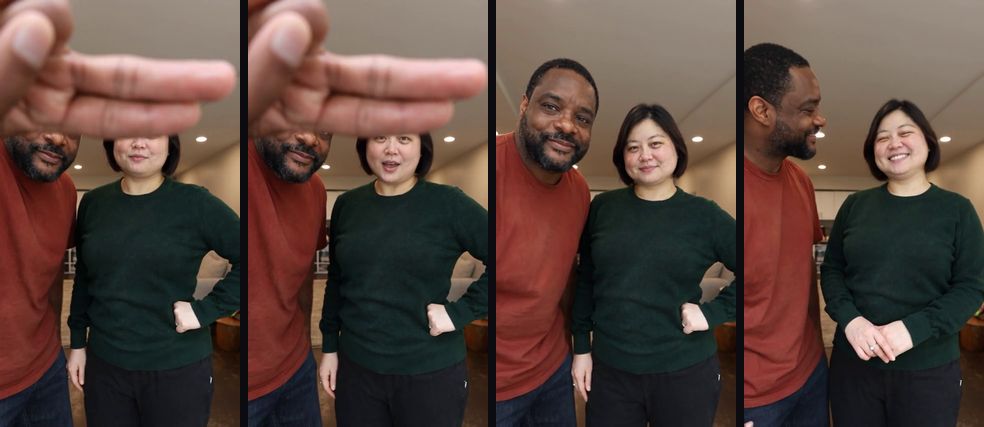
In the AI version, the two people are you and someone you choose. Faces, hair, build and clothes come from your photos; the room, the fingers, the handheld camera, the timing and the sound come from the clip.
Where does the finger swipe reveal trend come from?
The finger swipe reveal trend is a modern take on the oldest reveal there is. Peekaboo, the game of hiding your face and suddenly showing it again, works because the pause makes the reveal feel like a small surprise. Short-video creators borrowed the same rhythm with a hand in front of the camera: hide the eyes, hold it, then swipe away to show who is there. Hand and swipe moves are now their own corner of short-video editing; CapCut, for example, collects ready-made swipe-trend templates for TikTok.
This version needs no editing at all: the swipe is a real hand moving away from the lens, and the reveal is just two people who are clearly happy to be filmed together. That is why it works for couples, best friends and family pairs. This site is not affiliated with any creator of the clip, and the people in the original video do not appear in yours.
What happens in the Finger Swipe Reveal clip, second by second?
The Finger Swipe Reveal clip is one continuous shot, and the whole joke is the wait before the swipe.
| Time | What you see |
|---|---|
| 0–7 s | Two fingers cover both pairs of eyes; you smile and shift on your feet |
| About 7.3 s | The fingers swipe down and out of the frame |
| 7.5–9.5 s | Both faces in full view, looking at the camera, starting to laugh |
| 9.5–11 s | The person on the left turns to look at the person on the right |
| 11–12 s | Both look back at the camera with a final smile |
The example at the top of this page shows seconds 2 to 12, so it starts a little later than your video does. The video you get is the full 12 seconds, with two more seconds of the fingers covering your eyes at the start.
Who should stand where in the Finger Swipe Reveal AI video?
Put the person who turns to look on the left and the person who laughs on the right. In the clip, the left person glances over at their partner after the reveal, while the right person gets the biggest laugh.
| Slot | Position | What they do after the reveal |
|---|---|---|
| 1 · Left | Left of frame | Smiles, then turns to look at the other person |
| 2 · Right | Right of frame | Breaks into the biggest laugh, then smiles back at the camera |
For a couple, the one who usually does the looking goes left. For a "guess who's back" post, put the surprise guest on the right, since their laugh is what people remember.
Will the Finger Swipe Reveal AI video actually look like us?
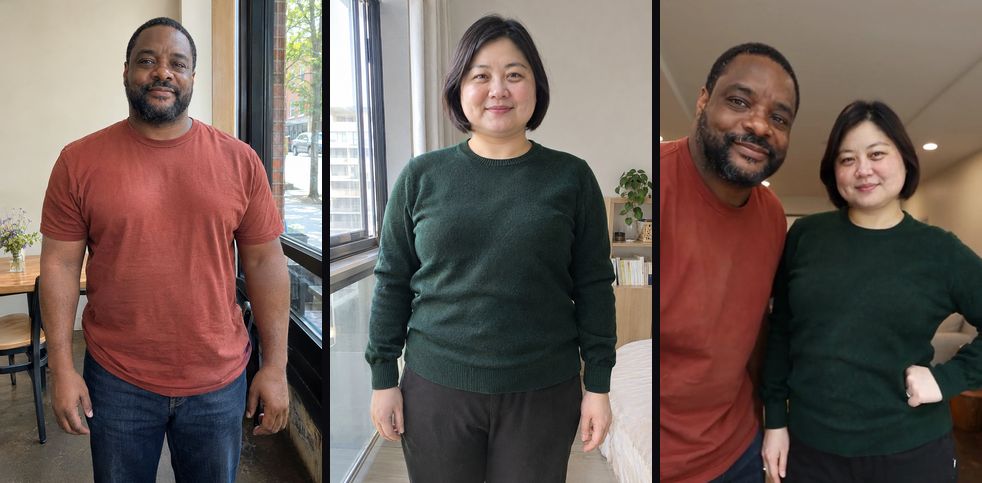
Yes. From the first frame after the swipe, both faces are the people in your photos: face shape, hairstyle, skin tone, beard and build, each in your own position and without swapping places. Even while the fingers hide your eyes, the smiles below them are already yours, and the outfits come from your photos too.
The example on this page was made with this effect from photos of two AI-generated, fictional adults. It is not the original clip and it is not edited. The fingers in front of the lens are part of the clip, so their size and skin tone stay the same whoever is in the photos.
What comes from your photos and what stays from the clip:
| Stays from the clip | Comes from your photos | May vary between runs |
|---|---|---|
| The warm room and ceiling lights | Faces, hairstyles and hair colour | How wide each laugh is |
| The fingers and the swipe | Each person's clothes | Small hand positions before the reveal |
| The handheld camera and timing | Skin tone, beard and build | Background details in the room |
| The 12-second length and the sound | Who stands on which side | The exact moment the left person turns |
How do I do the finger swipe reveal trend without filming it?
Upload a photo of each person on this page and press Generate, and Finger Swipe Reveal AI films the reveal for you, so you skip getting two people into one room, holding the phone and your fingers steady at the same time, and doing take after take until you both laugh on cue.
Which photos work best for the Finger Swipe Reveal AI video?
Clear, front-facing photos from the shoulders or chest up work best, one adult per photo. After the swipe both faces fill most of the frame, so sharp eyes and a visible hairstyle matter more than a full-body shot.
| Photo | What usually happens |
|---|---|
| Shoulders up or half body, facing the camera | Best match: both faces are clear after the reveal |
| Already smiling | The laugh after the swipe looks natural |
| Sunglasses or a hat | Hides the eyes the reveal is all about |
| Full-body photo from far away | The face is small, so the close-up is less like you |
| Group photo in one slot | The AI may pick the wrong person; crop to one |
How do you post a Finger Swipe Reveal AI video?
Post it as a "guess who" moment. The clip is built on a short wait, so the caption should make people want to see who is behind the fingers.
- Tease the reveal. "Guess who I'm spending the weekend with" or "you'll never guess who's back" makes people watch to second seven.
- Announce something. A new couple, a reunion with an old friend or a new teammate all suit the swipe-and-smile.
- Make it a family pair. Siblings or a parent with their grown-up child turn the reveal into an "obviously related" joke.
- Want another two-person clip? Oh You Can Make It Cap AI is a two-photo spin-and-laugh meme, and Tiny Desk AI gives up to three people a desk concert.
Price
480p costs 100 credits and 720p HD costs 200 credits. The $9.99 starter pack covers one 480p video.
No credits needed: pay for just this video from $9.99, once. Your first 480p video is $4.99.
Compare packs and plans →Good to know
- 480p is enough for a story or a group chat; 720p keeps faces sharper in close-ups and full-body shots, which is worth it for public posts.
- The sound is already in the MP4 and the moves are timed to it, so keep the original audio when you post.
- If the face drifts, try a sharper photo with even front light and nothing covering the eyes. Crop group photos to one person.
- A failed generation returns its credits automatically. If a video finishes but looks wrong, contact support with the video link.
- TikTok, YouTube and Instagram ask creators to label realistic AI video. Turn on the AI label when you post.
- Your photos are deleted after 7 days, and the video has no extra watermark.
Frequently asked questions
What is the Finger Swipe Reveal AI video?
An AI video effect that puts two people from your photos into a short reveal clip: two fingers cover your eyes for the first few seconds, then swipe down out of frame, and both of you smile and laugh at the camera.
Do I need two photos?
Yes. The clip has two different people side by side, so it takes one photo of each adult. The first photo is the person on the left, the second is the person on the right.
Whose fingers are in front of the camera?
The fingers come from the clip, not from your photos. They are held close to the lens, so they look big and slightly blurred, which is part of the effect.
Do we keep our own clothes?
Yes. Each person wears the outfit from their own photo; only the room, the fingers and the camera movement come from the clip.
How long is the video?
12 seconds, vertical 9:16, in one continuous handheld shot with the sound already in the file. The example on this page shows seconds 2 to 12; your video also includes the first two seconds, with the fingers already covering your eyes.
Is there a hat in this version?
No. Some descriptions of this trend mention a hat appearing after the swipe. This version is the plain reveal: the fingers move away and your real faces, with your own hair, appear.
Which photos work best?
Sharp, front-facing photos of one adult each, from the shoulders or chest up, eyes clearly visible and in even light. The reveal is a close-up, so the face matters more than the outfit.
Can I use it with a partner, a friend or a parent?
Yes, any two adults work, as long as both agree to be in the video. Couples, best friends, siblings and parent-and-adult-child pairs all suit the reveal.
Is it connected to the creators of the original clip?
No. The effect follows a video format; this site is not affiliated with any creator, and the original people do not appear in your video.
Inspired by the finger swipe reveal video trend. Not affiliated with any creator, and the video does not use their likeness.
Last updated 2026-11-04
More effects
Bulin 47 AI
Step into the Bulin 47 freestyle crowd with one photo.
Photos: 1 · from 100 credits
Burning Bridges AI
Take the yellow-shirt spot in the Burning Bridges party video.
Photos: 1 · from 100 credits
Crazy Frog AI Chase
Two photos, one invisible-motorcycle chase across five scenes.
Photos: 2 · from 100 credits
ABCDEFG I Need Money AI
Rap the alphabet, then point at the camera and ask for money.
Photos: 1 · from 100 credits