GTA 5 Goodbye AI – Goodbye GTA 5 Video From One Photo
GTA 5 Goodbye AI puts you into the viral "Goodbye GTA 5" farewell scene: on a Los Santos pier at sunset, three GTA V style characters hand you the new GTA and the keys to a pink sports car, one grips your shoulder, you hold back tears, say "Thanks" and drive off down the coast. Upload one photo and you play the player. Your face, hair and outfit come from the photo; the three characters, the shots, the lines and the music come from the scene, and you get a 30-second landscape 4:3 MP4 in 720p.
GTA 5 Goodbye AI at a glance
- Photos needed
- 1 · Your photo
- Video length
- About 30 seconds
- Format
- Landscape 4:3 MP4, 720p
- Sound
- Original soundtrack added
- Credits per video
- 270 credits
- Typical wait
- 3–10 minutes; you can close the page
- Privacy
- Photos deleted after 7 days, videos after 30, visible only to you
How do you make your own GTA 5 Goodbye AI video?
- 1
Upload one clear, waist-up photo of one person facing the camera; that person becomes the player.
- 2
Press Generate. The 30-second 720p video costs 270 credits.
- 3
Download the MP4 with the lines and music from My videos, usually a few minutes later.
What does the GTA 5 Goodbye AI video look like?
The GTA 5 Goodbye AI video is a 30-second, multi-shot farewell in the late-sun look of Los Santos. Three GTA V style characters say goodbye to a young player on a pier, hand over the new game and a set of car keys, and watch the player drive away along a palm-lined coast road.
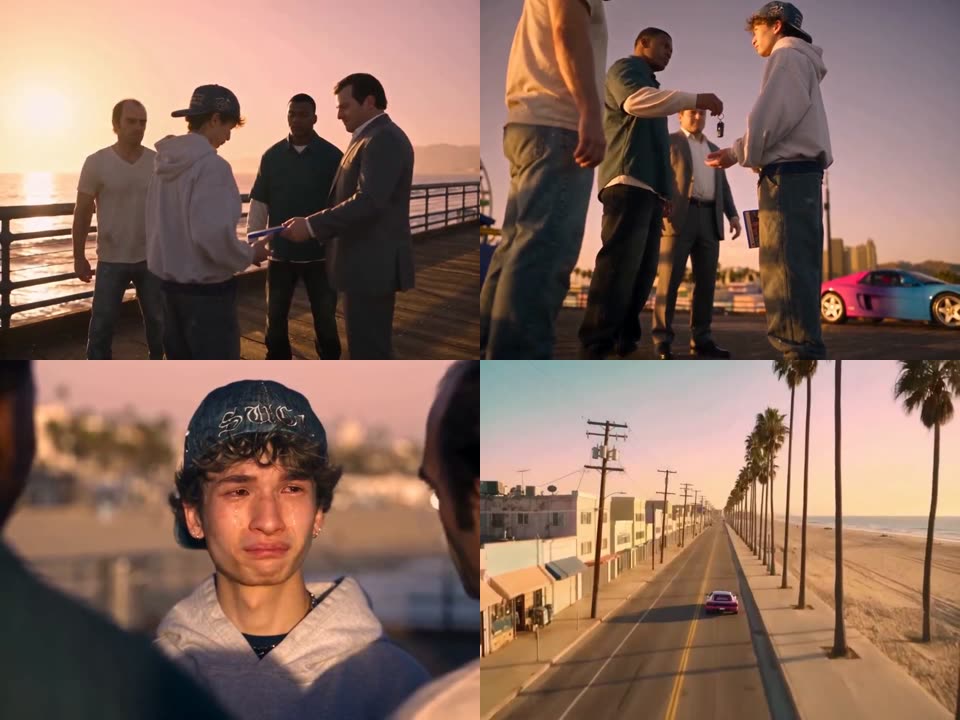
In your version, the player is you: your face, your hair and the outfit from your photo. The pier, the three characters, the camera, the lines and the music stay the same.
Where does the Goodbye GTA 5 trend come from?
GTA V came out on 17 September 2013, and GTA VI moves the series to Leonida and Vice City. For many players that is more than a decade in Los Santos, so in the run-up to the new game TikTok, Reels and Shorts filled with short, emotional AI clips of fans saying a last goodbye to Michael, Franklin and Trevor: a hand on the shoulder, the new game handed over, a tear, and one last drive.
The trend is fan-made. The scene here is a new AI-generated recreation: it uses no game footage, and this site is not affiliated with Rockstar Games or Take-Two Interactive.
What happens in the scene, second by second?
| Time | What happens |
|---|---|
| 0–5.5 s | On the pier at sunset the three hand the player the new GTA case: "Take care, kid." |
| 5.5–13 s | The car keys are handed over in front of a pink sports car |
| 13–16 s | A hand grips the player's shoulder |
| 16–20 s | A tearful close-up; the player answers: "Thanks." |
| 20–26 s | In the car, GTA V and GTA VI side by side on the passenger seat |
| 26–30 s | The three watch the car leave, then an aerial shot down the coast road |
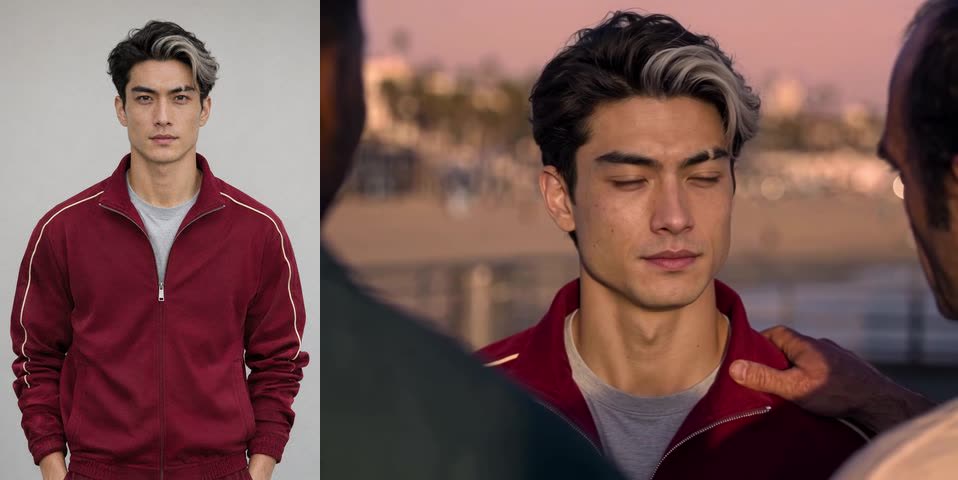
Will the GTA 5 Goodbye AI video actually look like me?
Yes. The face, hair and outfit from your photo carry through the pier, car and driving shots, and the scene's denim cap is dropped so you look like yourself in every shot.
This example was generated from a photo of an AI-made, fictional adult, using the same model and prompt as this effect, and was not edited.
| Stays from the scene | Comes from your photo | May vary between runs |
|---|---|---|
| The pier, the car and the coast road | Your face and skin tone | Small details of jewellery and logos |
| The three characters | Your hairstyle and hair colour | The exact expression on each beat |
| The lines, the timing and the music | Your top or jacket | Parts of the outfit the photo doesn't show |
| 30 seconds, landscape 4:3, 720p |
Which photo works best for the GTA 5 Goodbye AI video?
Several shots are close-ups of the player's face, and you wear the hair and top from your photo, so both matter.
| Photo | What usually happens |
|---|---|
| One adult, waist-up, facing the camera | Best match through every shot |
| Even daylight or soft indoor light | Natural skin in the sunset light |
| The jacket or top you want to wear | It carries into the video |
| Sunglasses, caps, hair over the face | Harder to keep the face recognisable |
| Group photos | Doesn't work: use one person per photo |
Only use a photo of yourself or of an adult who agreed to be in the video, and never a celebrity or a minor.
How do you post a GTA 5 Goodbye AI video?
Post it with the sound on; the "Thanks" close-up is the moment people stop for.
- Caption it like a farewell. "Goodbye GTA 5", "Thanks for the years, Los Santos" or "2013 – now".
- Label it as AI. Use the platform's AI label and keep it as a fan tribute, off ads and brand accounts.
- Want another scene? GTA 6 Apocalypse AI is the other side of the farewell: GTA 6 launches and the world ends outside your window. Burning Bridges AI and Unforgettable Car AI are other one-photo clips with their sound built in.
Price
This 30-second clip is made in 720p HD only and costs 270 credits.
Compare packs and plans →Good to know
- 480p is enough for a story or a group chat; 720p keeps faces sharper in close-ups and full-body shots, which is worth it for public posts.
- The sound is already in the MP4 and the moves are timed to it, so keep the original audio when you post.
- If the face drifts, try a sharper photo with even front light and nothing covering the eyes. Crop group photos to one person.
- A failed generation returns its credits automatically. If a video finishes but looks wrong, contact support with the video link.
- TikTok, YouTube and Instagram ask creators to label realistic AI video. Turn on the AI label when you post.
- Your photos are deleted after 7 days, and the video has no extra watermark.
Frequently asked questions
What is GTA 5 Goodbye AI?
An AI video effect that makes the "Goodbye GTA 5" farewell scene with you as the player: the sunset pier, the GTA case and the car keys, the hand on your shoulder, the tearful "Thanks" and the drive down the coast, with the sound already in the file.
How many photos do I need?
One. Only the player changes; the three other characters stay as they are in the scene.
Do I keep my own hair and clothes?
Yes. The player in the original wears a denim baseball cap; in your video the cap is dropped and you keep the face, skin tone, hairstyle and outfit from your photo. Anything the photo doesn't show is filled in.
Is it the real Michael, Franklin and Trevor?
No. All the people in the scene are AI-made characters in the style of GTA V, not the game's assets or voice actors. This site is not affiliated with Rockstar Games or Take-Two Interactive.
How long is the video and what format?
30 seconds, landscape 4:3, 720p, with the lines ("Take care, kid." and "Thanks.") and the music in the file.
How much does it cost?
270 credits per video. Credits are charged per second of video, and confirmed failures are refunded automatically.
Which photo works best?
A sharp, front-facing, waist-up photo of one adult in even light, without sunglasses or hair over the face. Several shots are close-ups, including the tearful one, and the top you wear carries into the video.
Inspired by the "Goodbye GTA 5" fan trend. Not affiliated with, endorsed by or sponsored by Rockstar Games or Take-Two Interactive. Grand Theft Auto and GTA belong to their owners; the characters in the scene are AI-made.
Last updated 2026-11-19
More effects
Bulin 47 AI
Step into the Bulin 47 freestyle crowd with one photo.
Photos: 1 · from 60 credits
Burning Bridges AI
Take the yellow-shirt spot in the Burning Bridges party video.
Photos: 1 · from 60 credits
Crazy Frog AI Chase
Two photos, one invisible-motorcycle chase across five scenes.
Photos: 2 · from 56 credits
ABCDEFG I Need Money AI
Rap the alphabet, then point at the camera and ask for money.
Photos: 1 · from 36 credits