How to Make an AI Rap Video From One Photo
Make an AI rap video from a single photo: which rap trends you can step into, how it works, which photo looks best, and what to do if you want your own song.
To make an AI rap video from one photo, pick a rap trend clip, upload a clear photo of your face, and let the AI put you in the rapper's place: the moves, the camera and the original sound stay, and the face becomes yours. You don't need to write bars, record vocals or film anything. This guide covers which rap trends work this way, how to get a result that looks like you, and what to use instead if you want to rap over your own song.
What is an AI rap video?
"AI rap video" means two quite different things, and it helps to know which one you want before you start.
| You want… | What it is | What you need |
|---|---|---|
| To be in a viral rap clip | A known clip where the rapper is replaced by you; moves, scene and sound stay the same | One photo |
| A music video for your own track | A new video lip-synced to a song or lyrics you supply | Your audio or lyrics, and usually several shots |
This site does the first kind. Each effect starts from a real trend clip, so the timing, gestures and audio already work. That is why it only takes a photo, and also why you can't swap in your own song (more on that below).
Which rap trends can you put yourself into?
Four effects here are built on rap and dembow clips. Each takes one photo and returns the clip with its original sound.
| Effect | What you do in it | Length and format |
|---|---|---|
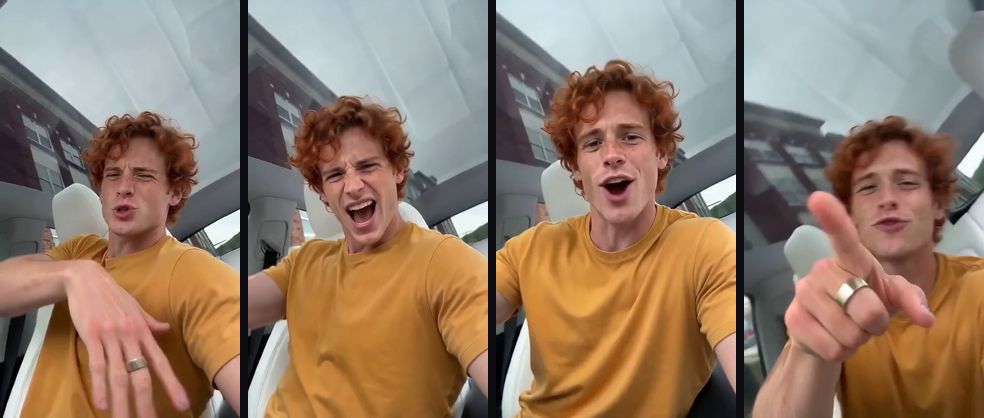
| ABCDEFG I Need Money AI | Rap the alphabet in a car selfie, stare, then point at the lens and ask for money | 9 s, vertical |
| Bulin 47 AI | Freestyle in a red-lit stairwell while a friend holds the speaker and the crowd keeps a straight face | 10 s, vertical |
| Burning Bridges | Host Drake's party toast: rap into the camera with a cup, pour a round and point at the lens | 15 or 20 s, landscape |
| Dame Hombro AI dance | Lead the shoulder-bounce dance to the song that grew out of the Bulin 47 freestyle | 15 s, portrait |
ABCDEFG I Need Money is the quickest joke: short, close up and built around one punchline. Bulin 47 is the hype-man format, best for crowning a friend on a birthday or a promotion. Burning Bridges is the big one, a wide party scene where you are the host everyone cheers for. Dame Hombro is less rapping and more dancing, for when you want the song without the bars.
How do you make an AI rap video from one photo?
- Open the effect for the trend you want from the table above. The example at the top of each page was made with that effect, so it shows what you will get.
- Upload one photo of yourself, or of a friend who has agreed to it.
- Pick 480p or 720p. The price is shown before you press Generate.
- Press Generate and wait a few minutes. You can close the page; the finished MP4, with the sound already synced, appears in My videos.
What photo makes the most convincing AI rapper?
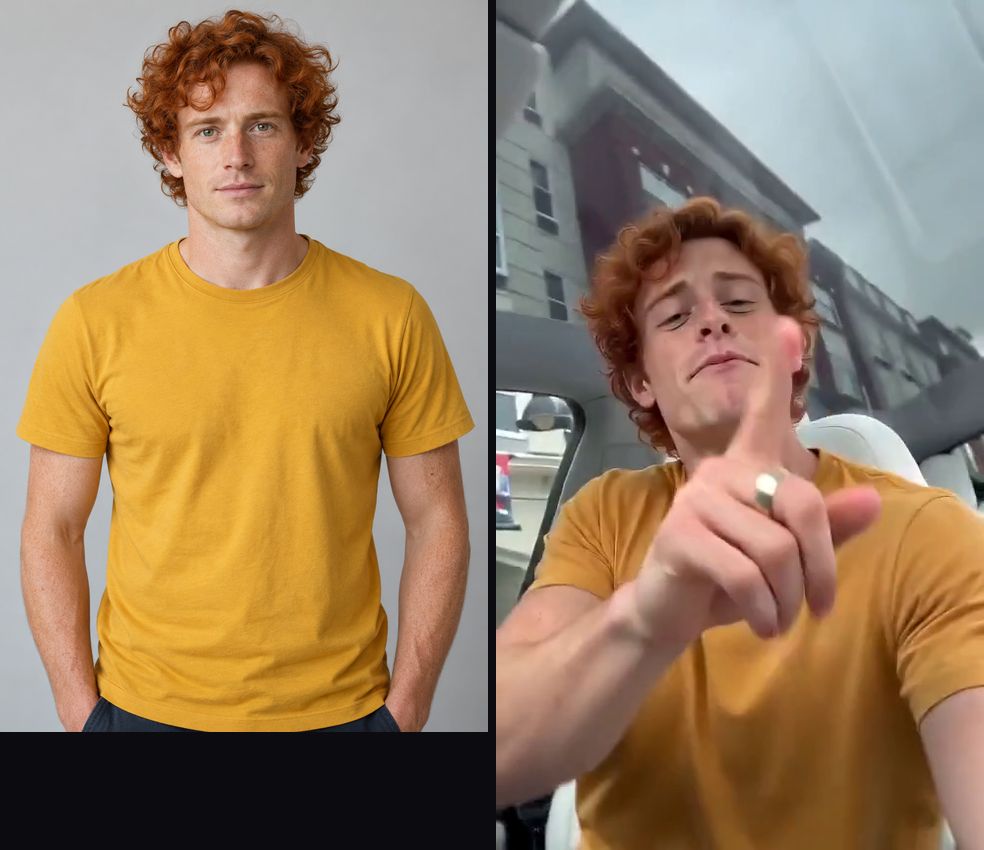
Rap clips are mostly close-ups with big expressions, so the face matters more than anything else.
- Face the camera, eyes visible. A front-facing photo in even light keeps your features through fast head moves and the lean into the lens.
- Half body beats a tight selfie. Your shoulders and top give the AI your build, which matters in Burning Bridges, where the host is shown head to waist.
- Expect the clip's accessories. In Bulin 47 the performer wears wraparound sunglasses for the whole clip, and they usually stay, so pick a photo where your face shape, beard and smile are clear.
- One person per photo. In a group shot the AI may choose the wrong face; crop it first.
- No heavy filters. Beauty modes smooth out the features that make you recognisable.
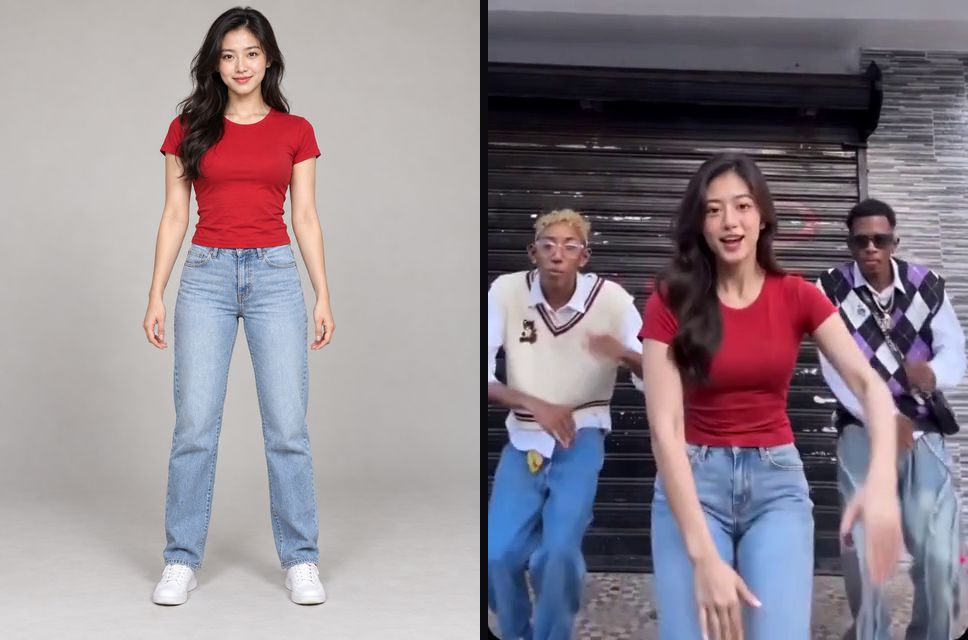
For more detail, see how to choose the best photo for an AI video.
Can I make an AI rap video with my own song or lyrics?
Not with these effects. Each one keeps the trend's original audio, because the moves, gestures and camera are timed to it; a different song would no longer line up. If you want to rap your own lyrics, you need a lip-sync music video tool that takes an audio file and animates a face to it, which is a different kind of product.
What you can do here is use the trend as the hook. Post the AI rap clip first, then follow it with your own track in the next video, or use it as a teaser for a release.
How should you post an AI rap video?
- Make the caption the setup. "When the group chat finally pays me back" in front of ABCDEFG I Need Money, or "my brother's birthday hype man" over Bulin 47, tells viewers who the joke is about.
- Cast your friends. The same clip from four different photos posted together is often funnier than one.
- Duet the original. Putting your version next to the trend shows off the swap.
- Label it as AI. TikTok, YouTube and Instagram ask creators to label realistic AI video, and there is a toggle for it when you post.
- Keep it personal. The songs and the original clips belong to their artists and creators, so these videos are for personal posts, not ads. Consent, rights and safety explains where the lines are, including when you use someone else's photo.
New rap trends are added as they appear; the home page lists every effect, newest first.